Overview
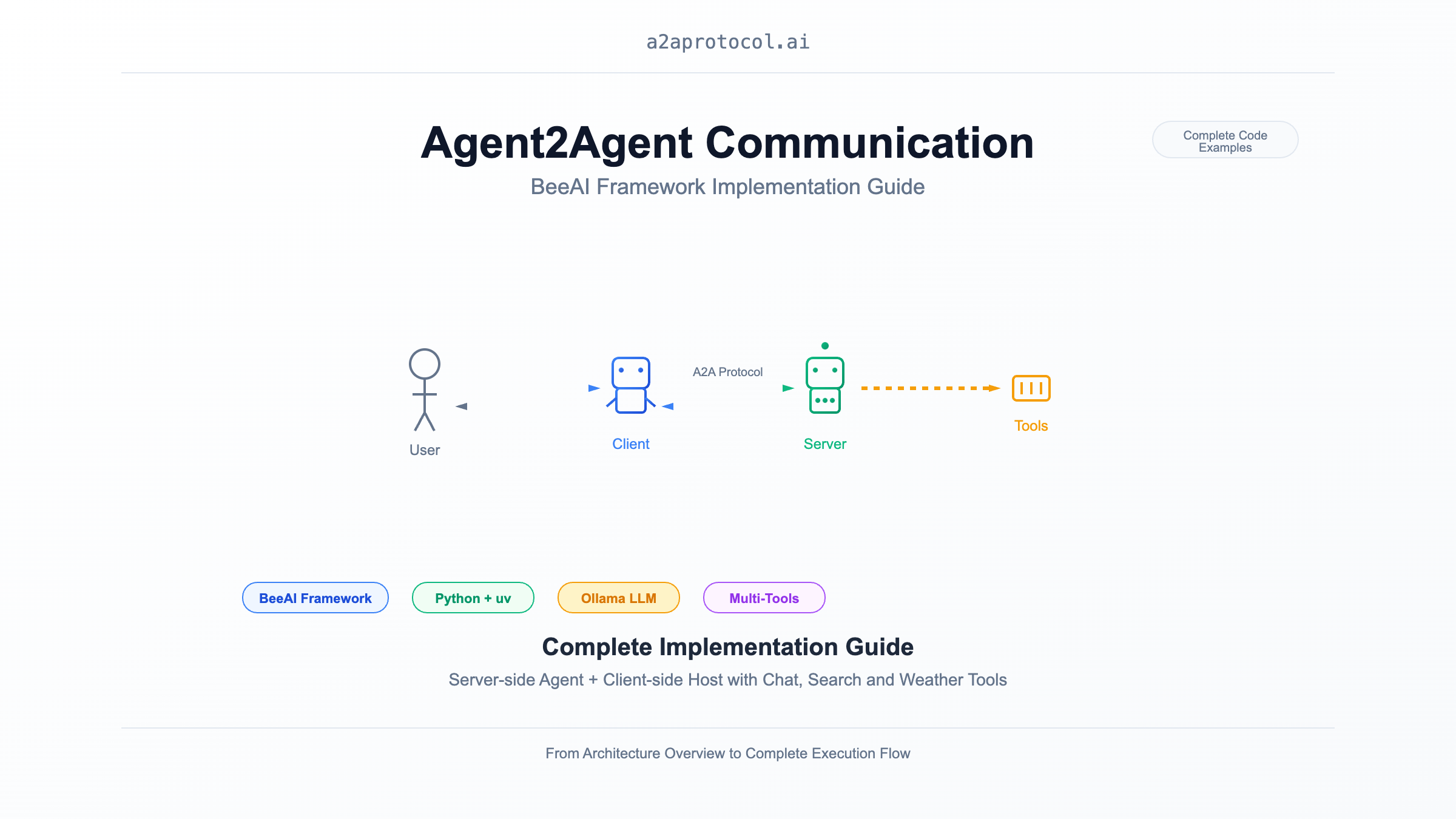
This document demonstrates how to implement Agent2Agent (A2A) communication using the BeeAI framework, including complete implementations of both server-side (Agent) and client-side (Host). This example showcases an intelligent chat agent with web search and weather query capabilities.
Architecture Overview
sequenceDiagram
    participant User as User
    participant Client as BeeAI Chat Client
    participant Server as BeeAI Chat Agent
    participant LLM as Ollama (granite3.3:8b)
    participant Tools as Tool Collection

    User->>Client: Input chat message
    Client->>Server: HTTP request (A2A Protocol)
    Server->>LLM: Process user request
    LLM->>Tools: Call tools (search/weather etc.)
    Tools-->>LLM: Return tool results
    LLM-->>Server: Generate response
    Server-->>Client: Return A2A response
    Client-->>User: Display chat results
Project Structure
samples/python/
├── agents/beeai-chat/          # A2A Server (Agent)
│   ├── __main__.py            # Server main program
│   ├── pyproject.toml         # Dependency configuration
│   ├── Dockerfile             # Containerization config
│   └── README.md              # Server documentation
└── hosts/beeai-chat/           # A2A Client (Host)
    ├── __main__.py            # Client main program
    ├── console_reader.py      # Console interaction interface
    ├── pyproject.toml         # Dependency configuration
    ├── Dockerfile             # Containerization config
    └── README.md              # Client documentation
Environment Setup
System Requirements
Install uv
# macOS/Linux
curl -LsSf https://astral.sh/uv/install.sh | sh

# Or use pip
pip install uv
Install Ollama and Model
# Install Ollama
curl -fsSL https://ollama.com/install.sh | sh

# Pull required model
ollama pull granite3.3:8b
A2A Server Implementation (Agent)
Core Implementation Analysis
The server uses BeeAI framework's RequirementAgent and A2AServer to provide intelligent agent services:
def main() -> None:
    # Configure LLM model
    llm = ChatModel.from_name(os.environ.get("BEEAI_MODEL", "ollama:granite3.3:8b"))

    # Create agent with tool configuration
    agent = RequirementAgent(
        llm=llm,
        tools=[ThinkTool(), DuckDuckGoSearchTool(), OpenMeteoTool(), WikipediaTool()],
        memory=UnconstrainedMemory(),
    )

    # Start A2A server
    A2AServer(
        config=A2AServerConfig(port=int(os.environ.get("A2A_PORT", 9999))),
        memory_manager=LRUMemoryManager(maxsize=100)
    ).register(agent).serve()
Key Features
- Tool Integration: Supports thinking, web search, weather queries, Wikipedia queries
- Memory Management: Uses LRU cache to manage session state
- Environment Configuration: Supports model and port configuration via environment variables
Running Server with uv
git clone https://github.com/a2aproject/a2a-samples.git
# Enter server directory
cd samples/python/agents/beeai-chat

# Create virtual environment and install dependencies with uv
uv venv
source .venv/bin/activate  # Linux/macOS
uv pip install -e .

# Important note
uv add "a2a-sdk[http-server]"

# Start server
uv run python __main__.py
Environment Variable Configuration
export BEEAI_MODEL="ollama:granite3.3:8b"  # LLM model
export A2A_PORT="9999"                     # Server port
export OLLAMA_API_BASE="http://localhost:11434"  # Ollama API address
A2A Client Implementation (Host)
Core Implementation Analysis
The client uses A2AAgent to communicate with the server, providing an interactive console interface:
async def main() -> None:
    reader = ConsoleReader()

    # Create A2A client
    agent = A2AAgent(
        url=os.environ.get("BEEAI_AGENT_URL", "http://127.0.0.1:9999"),
        memory=UnconstrainedMemory()
    )

    # User input processing loop
    for prompt in reader:
        response = await agent.run(prompt).on(
            "update",
            lambda data, _: (reader.write("Agent 🤖 (debug) : ", data)),
        )
        reader.write("Agent 🤖 : ", response.result.text)
Interactive Interface Features
- Real-time Debugging: Shows debug information during agent processing
- Graceful Exit: Input 'q' to exit program
- Error Handling: Handles empty input and network exceptions
Running Client with uv
# Enter client directory
cd samples/python/hosts/beeai-chat

# Create virtual environment and install dependencies with uv
uv venv
source .venv/bin/activate  # Linux/macOS
uv pip install -e .

# Start client
uv run python __main__.py
Environment Variable Configuration
export BEEAI_AGENT_URL="http://127.0.0.1:9999" # Server address
Complete Execution Flow
1. Start Server
# Terminal 1: Start A2A server
cd samples/python/agents/beeai-chat
uv venv && source .venv/bin/activate
uv pip install -e .
uv add "a2a-sdk[http-server]"
uv run python __main__.py
# Output
INFO:     Started server process [73108]
INFO:     Waiting for application startup.
INFO:     Application startup complete.
INFO:     Uvicorn running on http://0.0.0.0:9999 (Press CTRL+C to quit)
2. Start Client
# Terminal 2: Start A2A client
cd samples/python/hosts/beeai-chat
uv venv && source .venv/bin/activate
uv pip install -e .
uv run python __main__.py
# Output
Interactive session has started. To escape, input 'q' and submit.
User 👤 : what is the weather of new york today
Agent 🤖 (debug) :  value={'id': 'cb4059ebd3a44a2f8b428d83bbff8cac', 'jsonrpc': '2.0', 'result': {'contextId': 'b8a8d863-4c7d-48b7-9bdd-2848abccaae3', 'final': False, 'kind': 'status-update', 'status': {'state': 'submitted', 'timestamp': '2025-09-02T07:52:09.588387+00:00'}, 'taskId': '6e0fce64-51f0-4ad3-b0d5-c503b41bf63a'}}
Agent 🤖 (debug) :  value={'id': 'cb4059ebd3a44a2f8b428d83bbff8cac', 'jsonrpc': '2.0', 'result': {'contextId': 'b8a8d863-4c7d-48b7-9bdd-2848abccaae3', 'final': False, 'kind': 'status-update', 'status': {'state': 'working', 'timestamp': '2025-09-02T07:52:09.588564+00:00'}, 'taskId': '6e0fce64-51f0-4ad3-b0d5-c503b41bf63a'}}
Agent 🤖 (debug) :  value={'id': 'cb4059ebd3a44a2f8b428d83bbff8cac', 'jsonrpc': '2.0', 'result': {'contextId': 'b8a8d863-4c7d-48b7-9bdd-2848abccaae3', 'final': True, 'kind': 'status-update', 'status': {'message': {'contextId': 'b8a8d863-4c7d-48b7-9bdd-2848abccaae3', 'kind': 'message', 'messageId': '8dca470e-1665-41af-b0cf-6b47a1488f89', 'parts': [{'kind': 'text', 'text': 'The current weather in New York today is partly cloudy with a temperature of 16.2°C, 82% humidity, and a wind speed of 7 km/h.'}], 'role': 'agent', 'taskId': '6e0fce64-51f0-4ad3-b0d5-c503b41bf63a'}, 'state': 'completed', 'timestamp': '2025-09-02T07:52:39.928963+00:00'}, 'taskId': '6e0fce64-51f0-4ad3-b0d5-c503b41bf63a'}}
Agent 🤖 :  The current weather in New York today is partly cloudy with a temperature of 16.2°C, 82% humidity, and a wind speed of 7 km/h.
User 👤 :
3. Interaction Example
Interactive session has started. To escape, input 'q' and submit.
User 👤 : What's the weather like in Beijing today?
Agent 🤖 (debug) : Querying Beijing weather information...
Agent 🤖 : According to the latest weather data, Beijing is cloudy today with temperatures of 15-22°C, 65% humidity, and wind speed of 3m/s.

User 👤 : Search for the latest developments in artificial intelligence
Agent 🤖 (debug) : Searching for AI-related information...
Agent 🤖 : Based on search results, recent major developments in AI include...

User 👤 : q
Technical Points
Dependency Management
Both projects use pyproject.toml to manage dependencies:
Server Dependencies:
dependencies = [
    "beeai-framework[a2a,search] (>=0.1.36,<0.2.0)"
]
Client Dependencies:
dependencies = [
    "beeai-framework[a2a] (>=0.1.36,<0.2.0)",
    "pydantic (>=2.10,<3.0.0)",
]
Memory Management
- Server uses
LRUMemoryManagerto limit session count - Both client and server use
UnconstrainedMemoryto maintain conversation history
Tool Integration
The server integrates multiple tools:
ThinkTool: Internal thinking and reasoningDuckDuckGoSearchTool: Web searchOpenMeteoTool: Weather queriesWikipediaTool: Wikipedia queries
Extension and Customization
Adding New Tools
from beeai_framework.tools.custom import CustomTool

agent = RequirementAgent(
    llm=llm,
    tools=[
        ThinkTool(),
        DuckDuckGoSearchTool(),
        OpenMeteoTool(),
        WikipediaTool(),
        CustomTool()  # Add custom tool
    ],
    memory=UnconstrainedMemory(),
)
Custom Client Interface
You can replace ConsoleReader to implement GUI or Web interface:
class WebInterface:
    async def get_user_input(self):
        # Implement web interface input
        pass

    async def display_response(self, response):
        # Implement web interface output
        pass
Summary
This implementation guide demonstrates how to build a complete A2A communication system using the BeeAI framework and uv package manager. Through the server's intelligent agent and client's interactive interface, we've implemented a feature-rich chatbot system. This architecture has good scalability and can easily add new tools and features.
More A2A Protocol Examples
- A2A Multi-Agent Example: Number Guessing Game
- A2A MCP AG2 Intelligent Agent Example
- A2A + CrewAI + OpenRouter Chart Generation Agent Tutorial
- A2A JS Sample: Movie Agent
- A2A Python Sample: Github Agent
- A2A Sample: Travel Planner OpenRouter
- A2A Java Sample
- A2A Samples: Hello World Agent
- A2A Sample Methods and JSON Responses
- LlamaIndex File Chat Workflow with A2A Protocol
Featured Products
Tools and services from the A2A ecosystem directory.
Turn any flat image into named, editable layers—separate text, subjects, decorations, and backgrounds in just a few clicks.
Start with a simple prompt, then let our AI OC Maker turn your idea into anime characters, fantasy OCs, roleplay avatars, and full-body character designs.
Related Articles
Explore more content related to this topic
Integrating A2A Protocol - Intelligent Agent Communication Solution for BeeAI Framework
Using A2A protocol instead of ACP is a better choice for BeeAI, reducing protocol fragmentation and improving ecosystem integration.
A2UI Introduction - Declarative UI Protocol for Agent-Driven Interfaces
Discover A2UI, the declarative UI protocol that enables AI agents to generate rich, interactive user interfaces. Learn how A2UI works, who it's for, how to use it, and see real-world examples from Google Opal, Gemini Enterprise, and Flutter GenUI SDK.
Agent Gateway Protocol (AGP): Practical Tutorial and Specification
Learn the Agent Gateway Protocol (AGP): what it is, problems it solves, core spec (capability announcements, intent payloads, routing and error codes), routing algorithm, and how to run a working simulation.
A2A vs ACP Protocol Comparison Analysis Report
A2A (Agent2Agent Protocol) and ACP (Agent Communication Protocol) represent two mainstream technical approaches in AI multi-agent system communication: 'cross-platform interoperability' and 'local/edge autonomy' respectively. A2A, with its powerful cross-vendor interconnection capabilities and rich task collaboration mechanisms, has become the preferred choice for cloud-based and distributed multi-agent scenarios; while ACP, with its low-latency, local-first, cloud-independent characteristics, is suitable for privacy-sensitive, bandwidth-constrained, or edge computing environments. Both protocols have their own focus in protocol design, ecosystem construction, and standardization governance, and are expected to further converge in openness in the future. Developers are advised to choose the most suitable protocol stack based on actual business needs.
Building an A2A Currency Agent with LangGraph
This guide provides a detailed explanation of how to build an A2A-compliant agent using LangGraph and the Google Gemini model. We'll walk through the Currency Agent example from the A2A Python SDK, explaining each component, the flow of data, and how the A2A protocol facilitates agent interactions.