Vivix-W1 and Real-Time Interactive Video Generation
Most video generators follow a one-shot pattern: write a prompt, wait for a clip, then start over if the result is wrong. Vivix describes W1 as a different kind of system. It is designed to keep generating while a user continues to steer the scene with new input.
That changes video generation from “render this description” into a short feedback loop. A person can influence what happens next with text, a reference image, or voice, while the clip is still unfolding.
This article explains the idea behind Vivix-W1, how it differs from ordinary text-to-video, and what to evaluate before using a streaming model in a creative workflow.
1. From prompt-and-wait to a feedback loop
A conventional generator receives a prompt and produces a sequence. Interaction usually happens after generation: the user reviews the output, edits the prompt, and requests another version. Each iteration starts a new job.
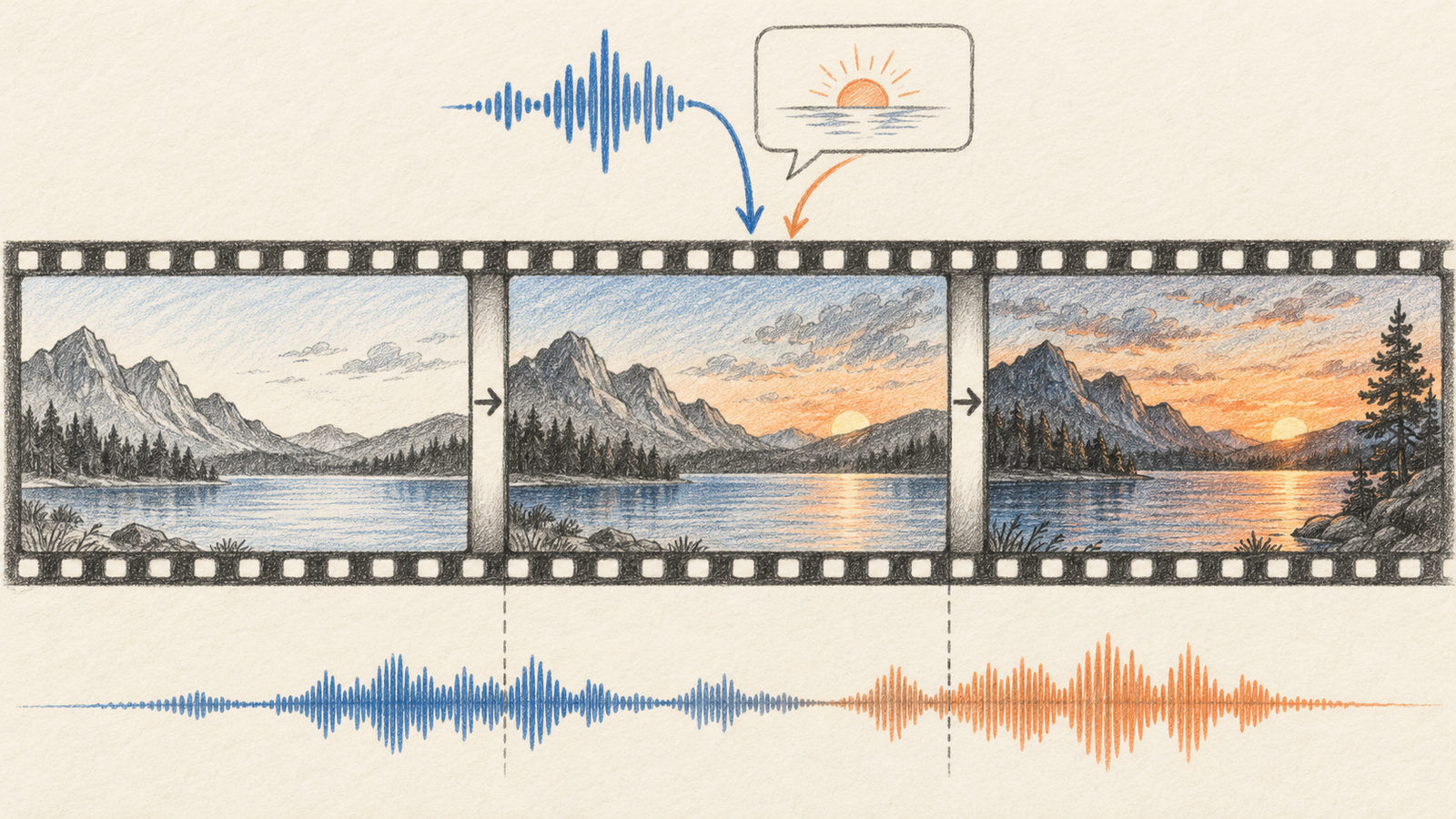
An interactive model aims to shorten that loop. It emits video over time and remains receptive to additional input. The user might first request a quiet mountain lake, then add a voice instruction to bring a boat into the next part of the scene. The system’s key property is not simply speed. It is the ability to incorporate the new instruction while the sequence is still being produced.
That design is useful for improvisation, live storytelling, interactive worlds, and tools where the user wants to guide a scene without repeatedly restarting. It also creates new questions: how late can an input arrive, how much does it change the scene, and does the output remain coherent after several interventions?
2. What Vivix says W1 can do
The Vivix W1 page presents the model as streaming-native and interactive. It describes support for text, image, audio, and video references, with synchronized audio in the generated output. The user can keep shaping the generated world as it plays.
“Streaming-native” is a description of the interaction model, not a promise that every generated frame is final or that every command will be followed instantly. The page is the source of the current feature claims; availability, latency, supported input lengths, and product access can change. Check the current page before designing around a particular interface or API.
3. Why multimodal inputs matter
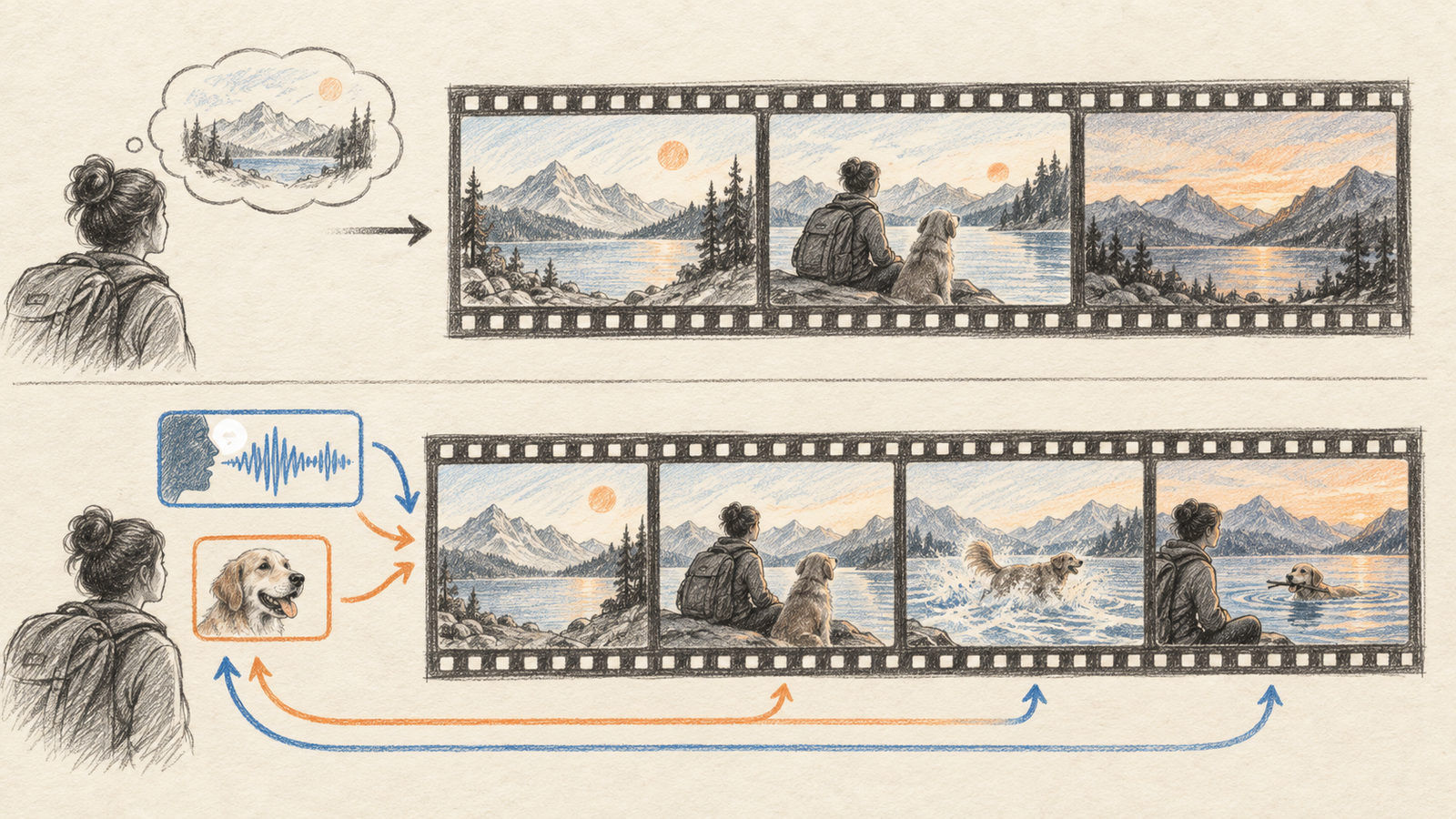
Text is a compact way to state intent, but it can be imprecise about motion, sound, and visual style. A reference image can anchor the appearance of a character or environment. Audio can carry a spoken direction or establish a soundscape. Video can provide motion or scene context.
Combining these inputs lets a creator express a request in the form that is easiest for the moment. A director could begin with a text description, provide a reference image for color and composition, then speak a correction when the scene begins to drift.
The model still has to resolve conflicts. If text asks for daylight while a reference video shows night, the output needs a priority rule. A production interface should make those inputs visible and help the user understand which ones were active. For evaluation, test changes one at a time before trying complex combinations.
4. A practical way to evaluate an interactive model
A useful test should measure control, not only visual quality. Prepare a short scene with a clear initial state, then introduce one change at a time:
- Start a clip with a simple environment and a subject performing one action.
- Add a new instruction during generation and note how long it takes to affect the next frames.
- Repeat with a visual reference, then with a spoken instruction.
- Check continuity: does the subject remain recognizable, does the camera stay plausible, and does the scene retain details that were not meant to change?
- Review the audio separately for synchronization and unwanted sound.
Record the prompt timing, input type, and result for each run. A model can look impressive in a single demo yet be hard to direct consistently. A small test matrix reveals whether changes are promptable, repeatable, and fast enough for the target use.
5. What changes for creators and developers
For a filmmaker, interactive generation could act like a rough virtual set: shape the scene live, explore alternatives, and retain the takes that are useful. For a game designer, it may suggest a way to generate narrative moments in response to player actions. For a developer, it raises the prospect of a video endpoint that accepts a stream of updates instead of a single request.
The application around the model becomes important. A good tool needs to show which inputs are being used, preserve a history of changes, allow a user to undo an instruction, and handle interruptions. If each correction is irreversible, the interaction can become harder than editing a prompt between generations.
Latency should be evaluated end to end. Time-to-first-frame, time from a new instruction to visible effect, stream stability, and audio delay matter more than a single benchmark. Compare the experience on the user’s actual device and network, not just a vendor demo.
6. Limits and open questions
Interactive generation makes control more immediate, but it does not guarantee precise control. A request may affect the scene gradually or alter more than intended. Longer sequences can accumulate inconsistencies in identity, objects, and spatial layout.
There are also operational questions. The public product page is the best source for current access and API availability; do not assume the model is generally available to every account. Before a launch, confirm input-size limits, export format, retention behavior, pricing, and whether a session can be resumed after a network interruption.
Video models also create familiar rights and safety concerns. Use references you have permission to use, obtain consent for a person’s likeness or voice, and label generated media when the audience could mistake it for real footage. Interactive control can make the output more compelling, which makes provenance more important.
Conclusion
Vivix-W1 points toward video tools that behave less like a render button and more like a live medium. The user can provide new direction as the scene unfolds, potentially using several kinds of input at once.
The main evaluation question is whether the model remains steerable without losing coherence. Test instruction timing, continuity, audio sync, and recovery from changes. Those practical measures will show whether interactive generation improves a workflow or simply makes experimentation more immediate.