Viggle-Animate Open Weights: Character Replacement for Video

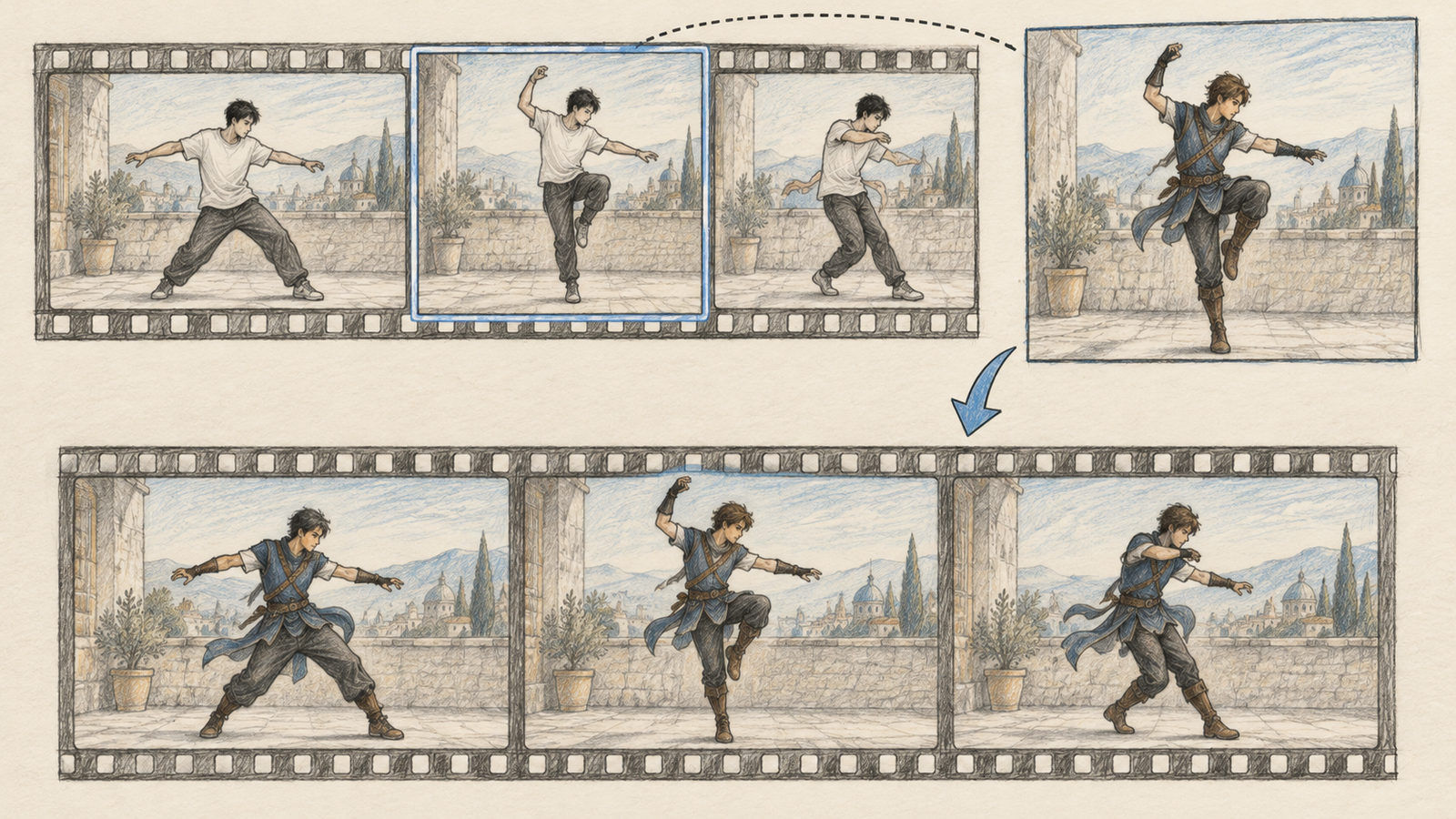
Replacing a character in a video used to involve a long sequence of masking, rotoscoping, tracking, and compositing. Viggle-Animate explores a narrower task: choose one frame from the source video, repaint its character, then use that edited frame to replace the character across the clip.
Viggle has published model weights for Viggle-Animate, making it possible to inspect the released artifacts and experiment beyond a hosted interface. The technique is interesting because it treats the motion in the source clip as a valuable signal instead of asking a text prompt to describe every pose. Its research page says video inference needs no pose skeleton, mask, or text prompt: the edited frame itself provides the appearance reference.
This guide breaks down the input-output pattern, explains what “open weights” means for a practical workflow, and lists the limitations to check before using a generated clip.
1. The character-replacement task
The key input is a source video plus one of its own frames, repainted to show the replacement character. The edited frame is not an unrelated character portrait. It keeps the selected frame’s composition and background while changing the subject’s appearance. Viggle-Animate then uses that frame to transfer the new character through the rest of the source motion.
That is different from ordinary text-to-video. A prompt such as “a wizard dances” asks a model to invent the entire scene and the motion. Character replacement starts with motion that already exists. The source clip determines timing and poses; the repainted frame supplies the target appearance in the same scene context.
Viggle’s research page describes Viggle-Animate as a character-replacement model and the Hugging Face model repository publishes transformer weights. The official model name is Viggle-Animate; check the research page and repository for the current release status, instructions, and supported artifacts.
2. Why source motion helps
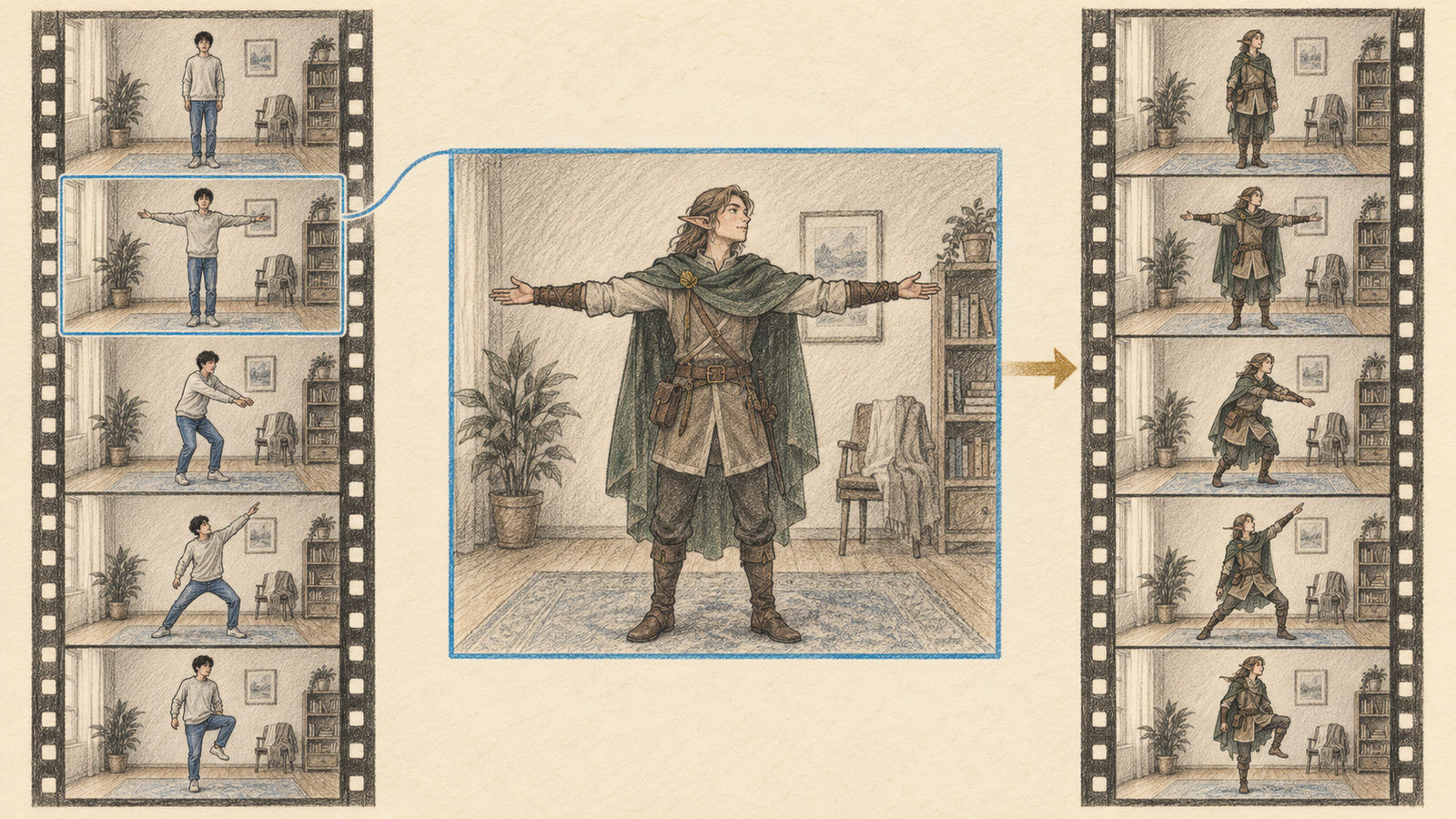
A video contains more than a sequence of subject shapes. It records how the subject moves through time: a hand rises, the body turns, and the weight shifts from one foot to another. Reusing that movement can preserve timing that would be difficult to specify in text.
The repainted frame answers a different question: what should the subject look like in this scene? It already contains the target design and the original background in one image. The model’s task is to carry that appearance across the rest of the source motion while maintaining a plausible relationship between the subject and the scene.
This makes the creative workflow compact: choose a movement, repaint one of its frames, then inspect how consistently the change carries through the video. It does not make the transformation perfect. Clothing, hair, small accessories, and face details can change between frames, especially during occlusion or fast turns.
3. What open weights let you do
Published weights allow developers to download and run the model under the repository’s supported setup, examine how it behaves, and build custom workflows around it. This is different from an API-only product where the operator controls the runtime.
Open weights do not automatically include an app, inference code, permissive license, or enough compute. The Hugging Face transformer directory is listed at 66.2 GB and marked minimax-h3-community-license, before other components or working storage. Check its model card for the license, compatible code, and hardware requirements; do not assume commercial or redistribution rights.
Local inference also needs compatible code, video decoding, preprocessing, and enough memory. Follow the official repository rather than assuming an unrelated script supports these weights.
4. A practical evaluation workflow
Before building a tool around the model, make a small set of controlled examples:
- Pick a short, well-lit clip with one clearly visible subject and limited camera motion.
- Select a representative frame from that clip and repaint the character while keeping the framing and scene context coherent.
- Run the inference path documented by the model repository with the original clip and repainted frame; the research page says no pose skeleton, mask, or text prompt is needed at video inference.
- Inspect the result at the beginning, middle, and end—not just the most attractive frame.
- Check identity consistency, pose alignment, edges, background stability, and motion flicker.
A successful first frame is not enough. Video quality depends on temporal coherence. Look for sudden changes in costume, body shape, or character position. Compare the generated clip with the original movement and note where the model loses alignment.
Prepare clips with the release workflow in mind. Use a constant frame rate when possible, trim irrelevant lead-in and tail, and keep the frame size within the documented inference limit. Repaint the chosen frame with edges that match the original silhouette; avoid changing the camera view or background. Save the original and edit side by side so failures can be traced to preprocessing, painting, or temporal propagation. These checks make comparisons reproducible when testing a new checkpoint.
5. Known limits and safety
Results are easier when the subject is unobstructed, motion is moderate, and the repainted frame is clear. Occlusion, fast cuts, multiple people, or a subject leaving the frame are harder cases.
The output can also change the original scene in unintended ways. Hair may merge with the background, shadows may not match, and accessories may appear or vanish. Treat generated footage as editable material that needs review, not as a transparent substitution that preserves every pixel.
The model can be used to create deceptive or non-consensual media. Only use source videos and repainted frames you have the right to transform. Obtain consent before using a real person’s likeness, and clearly label synthetic edits when viewers could mistake them for authentic footage.
6. Where it fits
Viggle-Animate fits short character-driven clips where motion already exists but the subject’s appearance should change. Storyboarding and visual prototyping are natural experiments. For exact text, brand details, or frame-perfect compositing, conventional editing or 3D tools may offer more control.
Conclusion
Viggle-Animate uses a repainted frame from the source video to change a character across existing motion. Start with a short clip, inspect the complete output, verify the license and runtime requirements, and transform only media you are authorized to use.