Qwen3-Coder-Next Complete 2026 Guide - Running AI Coding Agents Locally
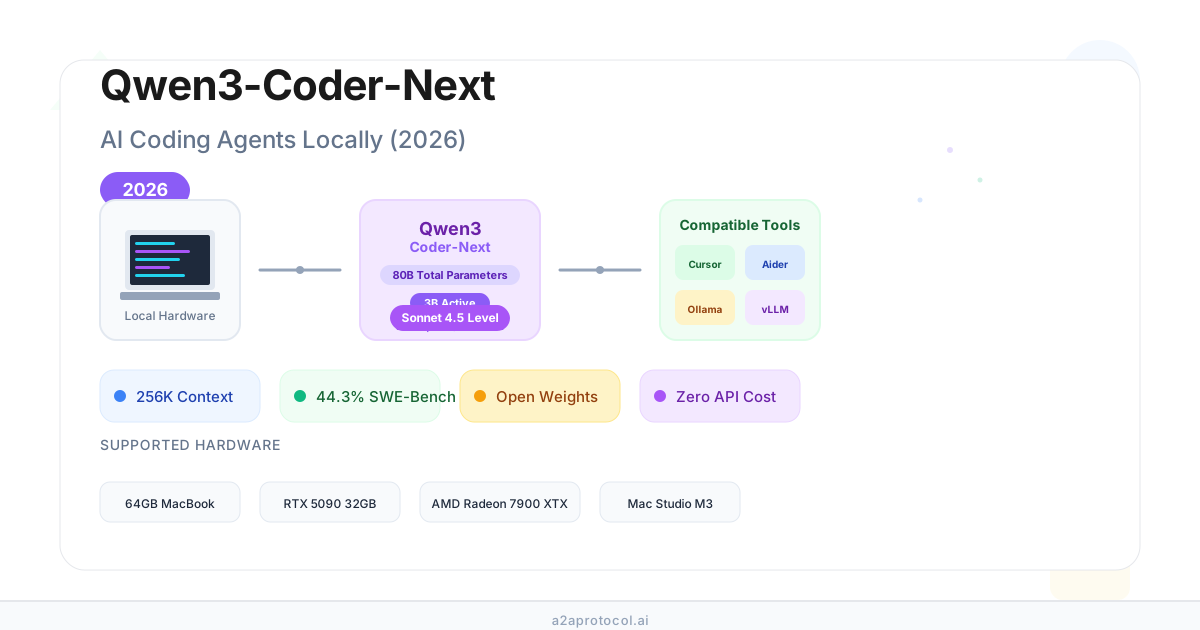
Qwen3-Coder-Next: The Complete 2026 Guide to Running Powerful AI Coding Agents Locally
🎯 Core Highlights (TL;DR)
- Revolutionary Efficiency: Qwen3-Coder-Next achieves Sonnet 4.5-level coding performance with only 3B activated parameters (80B total with MoE architecture)
- Local-First Design: Runs on consumer hardware (64GB MacBook, RTX 5090, or AMD Radeon 7900 XTX) with 256K context length
- Open Weights: Fully open-source model designed specifically for coding agents and local development
- Real-World Performance: Scores 44.3% on SWE-Bench Pro, competing with models 10-20x larger in active parameters
- Cost Effective: Eliminates expensive API costs while maintaining competitive coding capabilities
Table of Contents
- What is Qwen3-Coder-Next?
- Key Features and Architecture
- Performance Benchmarks
- Hardware Requirements and Setup
- How to Install and Run Qwen3-Coder-Next
- Integration with Coding Tools
- Quantization Options Explained
- Real-World Use Cases and Performance
- Comparison: Qwen3-Coder-Next vs Claude vs GPT
- Common Issues and Solutions
- FAQ
- Conclusion and Next Steps
What is Qwen3-Coder-Next?
Qwen3-Coder-Next is an open-weight language model released by Alibaba's Qwen team in February 2026, specifically designed for coding agents and local development environments. Unlike traditional large language models that require massive computational resources, Qwen3-Coder-Next uses a sophisticated Mixture-of-Experts (MoE) architecture that activates only 3 billion parameters at a time while maintaining a total parameter count of 80 billion.
Why It Matters
The model represents a significant breakthrough in making powerful AI coding assistants accessible to individual developers without relying on expensive cloud APIs or subscriptions. With the recent controversies around Anthropic's Claude Code restrictions and OpenAI's pricing models, Qwen3-Coder-Next offers a compelling alternative for developers who want:
- Data Privacy: Your code never leaves your machine
- Cost Control: No per-token pricing or monthly subscription limits
- Tool Freedom: Use any coding agent or IDE integration you prefer
- Offline Capability: Work without internet connectivity
💡 Key Innovation The model achieves performance comparable to Claude Sonnet 4.5 on coding benchmarks while using only 3B activated parameters, making it feasible to run on high-end consumer hardware.
Key Features and Architecture
Technical Specifications
| Specification | Details |
|---|---|
| Total Parameters | 80B |
| Activated Parameters | 3B (per inference) |
| Context Length | 256K tokens (native support) |
| Architecture | Hybrid: Gated DeltaNet + MoE + Gated Attention |
| Number of Experts | 512 total, 10 activated per token |
| Training Method | Large-scale executable task synthesis + RL |
| Model Type | Causal Language Model |
| License | Open weights |
Architecture Breakdown
The model uses a unique hybrid attention mechanism:
12 × [3 × (Gated DeltaNet → MoE) → 1 × (Gated Attention → MoE)]
What makes this special:
- Gated DeltaNet: Efficient linear attention for long-range dependencies
- Mixture of Experts (MoE): Only activates 10 out of 512 experts per token, dramatically reducing computational cost
- Gated Attention: Traditional attention mechanism for critical reasoning tasks
- Shared Experts: 1 expert always active for core capabilities
⚠️ Important Note This model does NOT support thinking mode (
<think></think>blocks). It generates responses directly without visible reasoning steps.
Training Methodology
Qwen3-Coder-Next was trained using:
- Executable Task Synthesis: Large-scale generation of verifiable programming tasks
- Environment Interaction: Direct learning from execution feedback
- Reinforcement Learning: Optimization based on task success rates
- Agent-Specific Training: Focused on long-horizon reasoning and tool usage
Performance Benchmarks
SWE-Bench Results
| Model | SWE-Bench Verified | SWE-Bench Pro | Avg Agent Turns |
|---|---|---|---|
| Qwen3-Coder-Next | 42.8% | 44.3% | ~150 |
| Claude Sonnet 4.5 | 45.2% | 46.1% | ~120 |
| Kimi K2.5 | 40.1% | 39.7% | ~50 |
| GPT-5.2-Codex | 43.5% | 42.8% | ~130 |
| DeepSeek-V3 | 38.9% | 37.2% | ~110 |
Other Coding Benchmarks
- TerminalBench 2.0: Competitive performance with frontier models
- Aider Benchmark: Strong tool-calling and file editing capabilities
- Multilingual Support: Excellent performance across Python, JavaScript, Java, C++, and more
📊 Interpretation While Qwen3-Coder-Next takes more agent turns on average (~150 vs ~120 for Sonnet 4.5), it achieves comparable success rates. This suggests it may require more iterations but ultimately solves similar numbers of problems.
Real-World Performance Reports
From community testing:
- Speed: 20-40 tokens/sec on consumer hardware (varies by quantization)
- Context Handling: Successfully manages 64K-128K context windows
- Tool Calling: Reliable function calling with JSON format
- Code Quality: Generates production-ready code for most common tasks
Hardware Requirements and Setup
Minimum Requirements by Quantization Level
| Quantization | VRAM/RAM Needed | Hardware Examples | Speed (tok/s) |
|---|---|---|---|
| Q2_K | ~26-30GB | 32GB Mac Mini M4 | 15-25 |
| Q4_K_XL | ~35-40GB | 64GB MacBook Pro, RTX 5090 32GB | 25-40 |
| Q6_K | ~50-55GB | 96GB Workstation, Mac Studio | 30-45 |
| Q8_0 | ~65-70GB | 128GB Workstation, Dual GPUs | 35-50 |
| FP8 | ~90-110GB | H100, A100, Multi-GPU setup | 40-60 |
Recommended Configurations
Budget Setup (~$2,000-3,000)
- Mac Mini M4 with 64GB unified memory
- Quantization: Q4_K_XL or Q4_K_M
- Expected speed: 20-30 tok/s
- Context: Up to 100K tokens
Enthusiast Setup (~$5,000-8,000)
- RTX 5090 (32GB) + 128GB DDR5 RAM
- Quantization: Q6_K or Q8_0
- Expected speed: 30-40 tok/s
- Context: Full 256K tokens
Professional Setup (~$10,000-15,000)
- Mac Studio M3 Ultra (256GB) OR
- Dual RTX 4090/5090 setup OR
- AMD Radeon 7900 XTX + 256GB RAM
- Quantization: Q8_0 or FP8
- Expected speed: 40-60 tok/s
- Context: Full 256K tokens
💡 Pro Tip MoE models like Qwen3-Coder-Next can efficiently split between GPU (dense layers) and CPU RAM (sparse experts), allowing you to run larger quantizations than your VRAM alone would suggest.
How to Install and Run Qwen3-Coder-Next
Method 1: Using llama.cpp (Recommended for Most Users)
Step 1: Install llama.cpp
# macOS with Homebrew
brew install llama.cpp

# Or build from source
git clone https://github.com/ggerganov/llama.cpp
cd llama.cpp
make
Step 2: Download the Model
# Using Hugging Face CLI (recommended)
llama-cli -hf unsloth/Qwen3-Coder-Next-GGUF:UD-Q4_K_XL

# Or download manually from:
# https://huggingface.co/unsloth/Qwen3-Coder-Next-GGUF
Step 3: Run the Server
llama-server \
  -hf unsloth/Qwen3-Coder-Next-GGUF:UD-Q4_K_XL \
  --fit on \
  --seed 3407 \
  --temp 1.0 \
  --top-p 0.95 \
  --min-p 0.01 \
  --top-k 40 \
  --jinja \
  --port 8080
This creates an OpenAI-compatible API endpoint at http://localhost:8080.
Method 2: Using Ollama (Easiest for Beginners)
# Install Ollama
curl -fsSL https://ollama.com/install.sh | sh

# Pull and run the model
ollama pull qwen3-coder-next
ollama run qwen3-coder-next
Method 3: Using vLLM (Best for Production)
# Install vLLM
pip install 'vllm>=0.15.0'

# Start server
vllm serve Qwen/Qwen3-Coder-Next \
  --port 8000 \
  --tensor-parallel-size 2 \
  --enable-auto-tool-choice \
  --tool-call-parser qwen3_coder
Method 4: Using SGLang (Fastest Inference)
# Install SGLang
pip install 'sglang[all]>=v0.5.8'

# Launch server
python -m sglang.launch_server \
  --model Qwen/Qwen3-Coder-Next \
  --port 30000 \
  --tp-size 2 \
  --tool-call-parser qwen3_coder
⚠️ Context Length Warning The default 256K context may cause OOM errors on systems with limited memory. Start with
--ctx-size 32768and increase gradually.
Integration with Coding Tools
OpenCode (Recommended)
OpenCode is an open-source coding agent that works excellently with Qwen3-Coder-Next:
# Install OpenCode
npm install -g @opencode/cli

# Configure for local model
opencode config set model http://localhost:8080/v1
opencode config set api-key "not-needed"

# Start coding
opencode
Cursor Integration
- Open Cursor Settings
- Navigate to "Models" → "Add Custom Model"
- Enter endpoint:
http://localhost:8080/v1 - Model name:
qwen3-coder-next
Continue.dev Integration
Edit ~/.continue/config.json:
{
  "models": [
    {
      "title": "Qwen3-Coder-Next",
      "provider": "openai",
      "model": "qwen3-coder-next",
      "apiBase": "http://localhost:8080/v1",
      "apiKey": "not-needed"
    }
  ]
}
Aider Integration
aider --model openai/qwen3-coder-next \
      --openai-api-base http://localhost:8080/v1 \
      --openai-api-key not-needed
💡 Best Practice Use recommended sampling parameters for optimal results:
- Temperature: 1.0
- Top-p: 0.95
- Top-k: 40
- Min-p: 0.01
Quantization Options Explained
Understanding Quantization Levels
| Quant Type | Bits | Size | Quality | Speed | Best For |
|---|---|---|---|---|---|
| Q2_K | 2-bit | ~26GB | Fair | Fastest | Testing, limited hardware |
| Q4_K_M | 4-bit | ~38GB | Good | Fast | Balanced performance |
| Q4_K_XL | 4-bit+ | ~40GB | Very Good | Fast | Recommended default |
| Q6_K | 6-bit | ~52GB | Excellent | Medium | High quality needs |
| Q8_0 | 8-bit | ~68GB | Near-perfect | Slower | Maximum quality |
| MXFP4_MOE | 4-bit | ~35GB | Good | Fast | NVIDIA GPUs only |
| FP8 | 8-bit | ~95GB | Perfect | Medium | Production use |
Unsloth Dynamic (UD) Quantization
The UD- prefix indicates Unsloth's dynamic quantization:
- Automatically upcasts important layers to higher precision
- Maintains model quality while reducing size
- Uses calibration datasets for optimal layer selection
- Typically provides better quality than standard quants at same size
Recommended choices:
- General use: UD-Q4_K_XL
- NVIDIA GPUs: MXFP4_MOE
- Maximum quality: Q8_0 or FP8
Real-World Use Cases and Performance
Community Testing Results
Test 1: Simple HTML Game (Flappy Bird)
- Model: Q8_0 on RTX 6000
- Result: ✅ One-shot success
- Speed: 60+ tok/s
- Code quality: Production-ready
Test 2: Complex React Application
- Model: Q4_K_XL on Mac Studio
- Result: ⚠️ Required 2-3 iterations
- Speed: 32 tok/s
- Code quality: Good with minor fixes needed
Test 3: Rust Code Analysis
- Model: Q4_K_XL on AMD 7900 XTX
- Result: ✅ Excellent analysis and suggestions
- Speed: 35-39 tok/s
- Context: 64K tokens handled well
Test 4: Tower Defense Game (Complex Prompt)
- Model: Various quantizations
- Result: ⚠️ Mixed - better than most local models but not perfect
- Common issues: Game balance, visual effects complexity
Performance vs Claude Code
| Aspect | Qwen3-Coder-Next (Local) | Claude Code |
|---|---|---|
| Speed | 20-40 tok/s | 50-80 tok/s |
| First-time success | 60-70% | 75-85% |
| Context handling | Excellent (256K) | Excellent (200K) |
| Tool calling | Reliable | Very reliable |
| Cost | $0 after hardware | $100/month |
| Privacy | Complete | Cloud-based |
| Offline use | ✅ Yes | ❌ No |
📊 Reality Check While Qwen3-Coder-Next is impressive, it's not quite at Claude Opus 4.5 level in practice. Think of it as comparable to Claude Sonnet 4.0 or GPT-4 Turbo - very capable but may need more guidance on complex tasks.
Comparison: Qwen3-Coder-Next vs Claude vs GPT
Feature Comparison Matrix
| Feature | Qwen3-Coder-Next | Claude Opus 4.5 | GPT-5.2-Codex | DeepSeek-V3 |
|---|---|---|---|---|
| Deployment | Local/Self-hosted | Cloud only | Cloud only | Cloud/Local |
| Cost | Hardware only | $100/mo | $200/mo | $0.14/M tokens |
| Speed (local) | 20-40 tok/s | N/A | N/A | 15-30 tok/s |
| Context | 256K | 200K | 128K | 128K |
| Tool calling | ✅ Excellent | ✅ Excellent | ✅ Excellent | ✅ Good |
| Code quality | Very Good | Excellent | Excellent | Good |
| Privacy | ✅ Complete | ❌ Cloud | ❌ Cloud | ⚠️ Depends |
| Offline | ✅ Yes | ❌ No | ❌ No | ⚠️ If local |
| Open weights | ✅ Yes | ❌ No | ❌ No | ✅ Yes |
When to Choose Each Model
Choose Qwen3-Coder-Next when:
- You have sensitive code/IP concerns
- You want zero marginal costs
- You need offline capability
- You have suitable hardware ($2K-10K budget)
- You're comfortable with 90-95% of frontier model capability
Choose Claude Opus 4.5 when:
- You need the absolute best coding quality
- Speed is critical (faster inference)
- You prefer zero setup hassle
- Budget allows $100-200/month
- You work on very complex, novel problems
Choose GPT-5.2-Codex when:
- You want strong reasoning capabilities
- You need excellent documentation generation
- You prefer OpenAI's ecosystem
- You have enterprise ChatGPT access
Common Issues and Solutions
Issue 1: Out of Memory (OOM) Errors
Symptoms: Model crashes during loading or inference
Solutions:
# Reduce context size
--ctx-size 32768  # Instead of default 256K

# Use smaller quantization
# Try Q4_K_M instead of Q6_K

# Enable CPU offloading
--n-gpu-layers 30  # Adjust based on your VRAM
Issue 2: Slow Inference Speed
Symptoms: < 10 tokens/second
Solutions:
- Use MXFP4_MOE on NVIDIA GPUs
- Enable
--no-mmapand--fa onflags - Reduce context window
- Check if model is fully loaded to GPU
Issue 3: Model Gets Stuck in Loops
Symptoms: Repeats same actions or text continuously
Solutions:
# Adjust sampling parameters
--temp 1.0        # Default temperature
--top-p 0.95      # Nucleus sampling
--top-k 40        # Top-k sampling
--repeat-penalty 1.1  # Penalize repetition
Issue 4: Poor Tool Calling with OpenCode/Cline
Symptoms: Model doesn't follow tool schemas correctly
Solutions:
- Ensure you're using
--tool-call-parser qwen3_coder - Update to latest llama.cpp/vLLM version
- Try Q6_K or higher quantization
- Use recommended sampling parameters
Issue 5: MLX Performance Issues on Mac
Symptoms: Slow prompt processing, frequent re-processing
Solutions:
- Use llama.cpp instead of MLX for better KV cache handling
- Try LM Studio which has optimized MLX implementation
- Reduce branching in conversations (avoid regenerating responses)
⚠️ Known Limitation MLX currently has issues with KV cache consistency during conversation branching. Use llama.cpp for better experience on Mac.
FAQ
Q: Can I run Qwen3-Coder-Next on a MacBook with 32GB RAM?
A: Yes, but you'll need to use aggressive quantization (Q2_K or Q4_K_M) and limit context to 64K-100K tokens. Performance will be around 15-25 tok/s, which is usable but not ideal for intensive coding sessions.
Q: Is Qwen3-Coder-Next better than Claude Code?
A: Not quite. In practice, it performs closer to Claude Sonnet 4.0 level. It's excellent for most coding tasks but may struggle with very complex, novel problems that Opus 4.5 handles easily. The trade-off is complete privacy and zero ongoing costs.
Q: Can I use this with VS Code Copilot?
A: Not directly as a Copilot replacement, but you can use it with VS Code extensions like Continue.dev, Cline, or Twinny that support custom model endpoints.
Q: How does quantization affect code quality?
A: Q4 and above maintain very good quality. Q2 shows noticeable degradation. For production use, Q6 or Q8 is recommended. The UD (Unsloth Dynamic) variants provide better quality at the same bit level.
Q: Will this work with my AMD GPU?
A: Yes! llama.cpp supports AMD GPUs via ROCm or Vulkan. Users report good results with Radeon 7900 XTX. MXFP4 quantization is NVIDIA-only, but other quants work fine.
Q: Can I fine-tune this model on my own code?
A: Yes, the model supports fine-tuning. Use Unsloth or Axolotl for efficient fine-tuning. However, with 80B parameters, you'll need significant compute (multi-GPU setup recommended).
Q: How does this compare to DeepSeek-V3?
A: Qwen3-Coder-Next generally performs better on coding agent tasks and has better tool-calling capabilities. DeepSeek-V3 is more general-purpose and may be better for non-coding tasks.
Q: Is there a smaller version for lower-end hardware?
A: Consider Qwen2.5-Coder-32B or GLM-4.7-Flash for more modest hardware. They're less capable but run well on 16-32GB systems.
Q: Can I use this commercially?
A: Yes, Qwen3-Coder-Next is released with open weights under a permissive license allowing commercial use. Always check the latest license terms on Hugging Face.
Q: Why does it take so many agent turns compared to other models?
A: The model is optimized for reliability over speed. It takes more exploratory steps but maintains consistency. This is actually beneficial for complex tasks where rushing leads to errors.
Conclusion and Next Steps
Qwen3-Coder-Next represents a significant milestone in making powerful AI coding assistants accessible to individual developers. While it may not match the absolute peak performance of Claude Opus 4.5 or GPT-5.2-Codex, it offers a compelling combination of:
- Strong performance (90-95% of frontier models)
- Complete privacy (runs entirely on your hardware)
- Zero marginal costs (no per-token pricing)
- Tool freedom (use any coding agent you prefer)
Recommended Action Plan
Week 1: Testing Phase
- Install llama.cpp or Ollama
- Download Q4_K_XL quantization
- Test with simple coding tasks
- Measure speed and quality on your hardware
Week 2: Integration Phase
- Choose your preferred coding agent (OpenCode, Aider, Continue.dev)
- Configure optimal sampling parameters
- Test with real projects
- Compare with your current workflow
Week 3: Optimization Phase
- Experiment with different quantizations
- Optimize context window size
- Fine-tune for your specific use cases (optional)
- Set up automated workflows
Future Outlook
The gap between open-weight and closed models continues to narrow. With releases like Qwen3-Coder-Next, GLM-4.7-Flash, and upcoming models from DeepSeek and others, we're approaching a future where:
- Most developers can run SOTA-level models locally
- Privacy and cost concerns are eliminated
- Innovation happens in open ecosystems
- Tool diversity flourishes without vendor lock-in
Additional Resources
- Official Documentation: Qwen Documentation
- Model Repository: Hugging Face - Qwen/Qwen3-Coder-Next
- GGUF Quantizations: Unsloth GGUF Repository
- Technical Report: Qwen3-Coder-Next Technical Report
- Community Discussion: r/LocalLLaMA
Last Updated: February 2026 | Model Version: Qwen3-Coder-Next (80B-A3B) | Guide Version: 1.0
💡 Stay Updated The AI landscape evolves rapidly. Follow Qwen's blog and GitHub repository for updates, and join the LocalLLaMA community for real-world usage tips and optimization techniques.
Related Posts
- 2026 Complete Guide: How to Use GLM-OCR for Next-Gen Document Understanding — 0.9B-parameter multimodal OCR model for complex document understanding
- The Complete 2026 Guide: Moltworker — Running Personal AI Agents on Cloudflare Without Hardware — Deploy AI agents on Cloudflare with no infrastructure costs
- Universal Commerce Protocol (UCP): The Complete 2026 Guide to Agentic Commerce Standards — Open standard for AI-powered commerce and payment processing
Featured Products
Tools and services from the A2A ecosystem directory.
Turn any flat image into named, editable layers—separate text, subjects, decorations, and backgrounds in just a few clicks.
Start with a simple prompt, then let our AI OC Maker turn your idea into anime characters, fantasy OCs, roleplay avatars, and full-body character designs.
Related Articles
Explore more content related to this topic
2026 Complete Guide to GLM-OCR for Next-Gen Document Understanding
GLM-OCR is a 0.9B-parameter multimodal OCR model built on the GLM-V architecture, designed for complex document understanding, not just text extraction. Delivers structure-first outputs (semantic Markdown, JSON, LaTeX), accurately reconstructing tables, formulas, layout, and handwriting across 100+ languages with state-of-the-art OmniDocBench V1.5 performance (94.62) at ~1.86 PDF pages/second.
Moltworker Complete Guide 2026: Running Personal AI Agents on Cloudflare Without Hardware
Complete guide to Moltworker: run Moltbot AI agents on Cloudflare without hardware. Architecture, deployment steps, security practices, comparison with self-hosting, and FAQ.
Universal Commerce Protocol (UCP): The Complete 2026 Guide to Agentic Commerce Standards
Discover Universal Commerce Protocol (UCP), the open standard revolutionizing agentic commerce. Learn how UCP enables seamless interoperability between AI platforms, businesses, and payment providers, solving fragmented commerce journeys with standardized APIs for checkout, order management, and payment processing.
The A2UI Protocol: A 2026 Complete Guide to Agent-Driven Interfaces
Discover A2UI, the security-first declarative UI protocol that enables AI agents to generate rich, interactive user interfaces. Learn how A2UI solves the 'Chat Wall' problem, achieves security through data vs. code separation, and enables dynamic cross-platform interfaces. Includes real-world examples and implementation guidance.
Implementing A2A Agents with ADK: Complete Development Guide
This guide provides a detailed introduction on how to use Google ADK (Agent Development Kit) framework to implement A2A (Agent2Agent Protocol) intelligent agent systems. From environment setup, project structure design to server-side and client-side agent development, covering the complete development process to help developers quickly build intelligent agent applications that support distributed communication.