2026 Complete Guide to GLM-OCR for Next-Gen Document Understanding
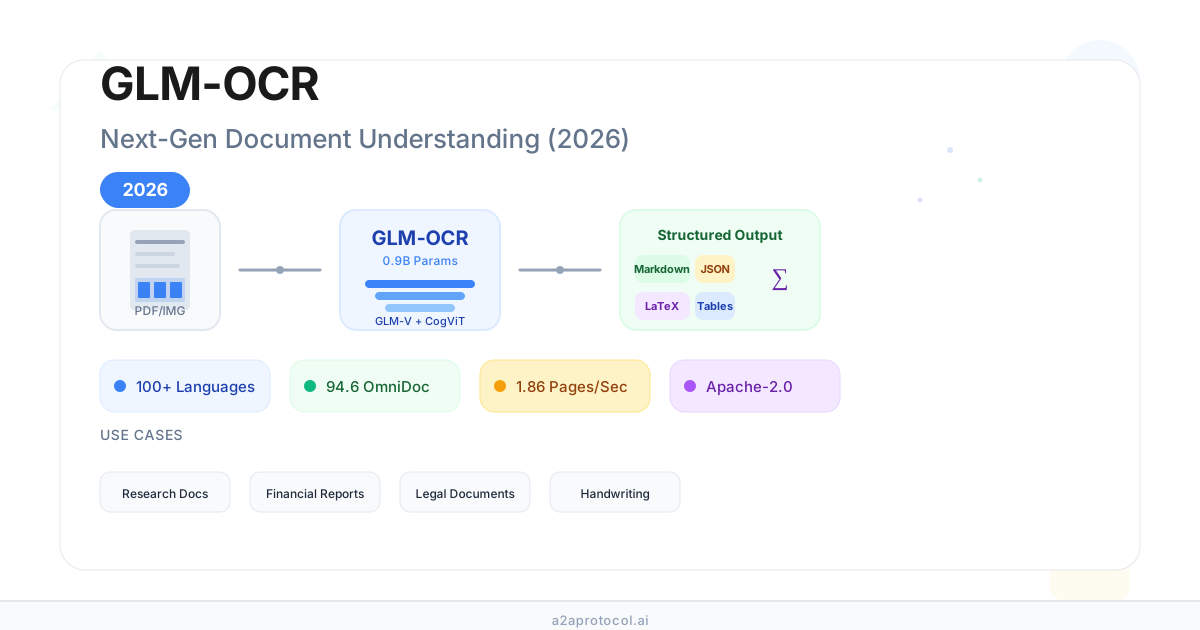
2026 Complete Guide: How to Use GLM-OCR for Next-Gen Document Understanding
🎯 Core Takeaways (TL;DR)
- GLM-OCR is a 0.9B-parameter multimodal OCR model built on the GLM-V architecture, designed for complex document understanding, not just text extraction.[1][2]
- It delivers structure-first outputs (semantic Markdown, JSON, LaTeX), accurately reconstructing tables, formulas, layout, and even handwriting across 100+ languages.[1]
- GLM-OCR achieves state-of-the-art performance on OmniDocBench V1.5 (94.62) while remaining lightweight and fast, with ~1.86 PDF pages/second, making it suitable for research, finance, legal, and developer workflows with open Apache-2.0 weights.[1][2][3]
Table of Contents
- What Is GLM-OCR?
- How Does GLM-OCR Work Architecturally?
- What Are the Key Features and Technical Specs?
- How Well Does GLM-OCR Perform? (Benchmarks & Precision)
- Where Can You Use GLM-OCR? Real-World Use Cases
- GLM-OCR vs Other OCR Models (PaddleOCR, DeepSeekOCR, VLMs)
- How to Deploy and Use GLM-OCR in Practice
- Step-by-Step Workflow: From PDF/Image to Structured Data
- Best Practices, Tips, and Caveats
- 🤔 Frequently Asked Questions (FAQ)
- Conclusion and Recommended Next Steps
What Is GLM-OCR?
GLM-OCR is a multimodal OCR model for complex document understanding, derived from the GLM-4V / GLM-V vision-language architecture.[1][2] Unlike classic OCR systems that only output raw text, GLM-OCR focuses on:
- Understanding layouts (headings, sections, footnotes, tables, figures)
- Preserving structure in semantic formats (Markdown, JSON, LaTeX)
- Reasoning about content, not just recognizing characters
Key characteristics:
- Lightweight: ~0.9B parameters, dramatically smaller than many VLM-based OCR models while keeping SOTA accuracy.[2][3]
- Multimodal: Consumes PDFs and images (JPG/PNG), outputs rich structured representations.[1][2]
- Open-weight & Apache-2.0 licensed: Suitable for commercial use and on-prem deployments.[1][3]
✅ Best for: Teams that need high-accuracy OCR plus document structure (tables, formulas, headings) at reasonable compute cost and want open-source licensing.
How Does GLM-OCR Work Architecturally?
GLM-OCR uses a three-stage pipeline that combines computer vision and language modeling.[1][2]
Architecture Overview
| Stage | Component / Tech | What It Does |
|---|---|---|
| 1. Visual Ingestion | CogViT visual encoder[2] | Captures pixel-level and layout information from pages |
| 2. Multimodal Reasoning | GLM-V-based vision-language fusion[1] | Aligns visual features with language understanding |
| 3. Structured Generation | Decoder with Multi-Token Prediction (MTP)[1] | Generates structured Markdown/JSON/LaTeX, correcting errors |
Key design ideas:
- CogViT encoder: A specialized vision backbone optimized for documents, not generic images.[2]
- GLM-V multimodal reasoning: Allows the model to interpret relationships between text blocks, tables, and figures.
- Multi-Token Prediction (MTP): Predicts multiple tokens per step and uses context to fix errors on the fly—this behaves more like semantic proofreading than naive character recognition.[1]
💡 Pro Tip
MTP is especially valuable on noisy scans or handwriting: GLM-OCR can use surrounding context to infer the correct token sequence instead of rigidly copying visual artifacts.
What Are the Key Features and Technical Specs?
Document Understanding Features
- Layout semantics awareness
- Detects and preserves headings, subheadings, section hierarchies, footnotes, captions, and other structural elements.[1]
- Tables → Markdown
- Converts complex tables into Markdown (and can be further transformed into CSV/Excel).[1]
- Formulas → LaTeX
- Reconstructs complex mathematical expressions into valid LaTeX.[1]
- Handwriting interpretation
- Handles handwritten notes and annotations using contextual reasoning.[1]
- Contextual perception
- Fixes mis-detections as it generates, using language modeling to ensure globally coherent output.[1]
Language & Format Support
-
Input formats:
- PDF (up to ~50 MB, up to 100 pages per document)[2]
- Images: JPG, PNG (up to ~10 MB per image)[2]
-
Output formats:
- Semantic Markdown (with headings, tables, lists, code blocks)[1][2]
- JSON (structure-first; ideal for downstream pipelines)[1]
- LaTeX for mathematical content and formulas[1]
-
Languages:
- Supports 100+ languages, with strong performance in English, Chinese (中文), Japanese (日本語) and major European languages.[1][2]
Core Technical Specs
| Spec | Value / Description |
|---|---|
| Model size | 0.9B parameters[2] |
| Architecture | GLM-V-based multimodal + CogViT visual encoder[1][2] |
| Input modalities | PDF, images (JPG, PNG)[1][2] |
| Max pages per PDF | ~100 pages[2] |
| Output formats | Markdown, LaTeX, JSON[1][2] |
| License | Apache-2.0 (open-weight)[1][3] |
| Deployment frameworks | VLLM, SGLang, API, local runners[2][3] |
✅ Best Practice
For automation and integration, prefer JSON output; for human-readable exports and documentation, use semantic Markdown + LaTeX.
How Well Does GLM-OCR Perform? (Benchmarks & Precision)
OmniDocBench Performance
GLM-OCR is reported as state-of-the-art on OmniDocBench V1.5, a leading benchmark for document understanding.[2][3][4]
- Score: ~94.62 on OmniDocBench V1.5[2][3][4]
- Position: #1 on that benchmark among document parsing models in its class.[2][3]
These scores are especially impressive given its only 0.9B parameters, which is much smaller than many competing VLM-based OCR models.[2][3]
Throughput & Speed
From official documentation:[2]
- PDF throughput: ~1.86 pages/second
- Image throughput: ~0.67 images/second
This makes GLM-OCR viable for bulk-processing pipelines (e.g., nightly jobs over large archives) even on modest hardware.
Precision Modes
The official site highlights a PRECISION_MODE_ON, claiming up to 99.9% precision in that mode.[1] While exact metric definitions are not fully spelled out, the key takeaway is:
- NORMAL mode – better for speed, good default.
- PRECISION mode – slower but very high character-level and structure-level precision; ideal for legal and financial workloads.
⚠️ Note
Exact accuracy numbers for every domain (e.g., receipts vs. scientific PDFs) are not fully broken down publicly, so you should run your own evaluation on representative samples before committing to production.
Where Can You Use GLM-OCR? Real-World Use Cases
The official site and surrounding ecosystem emphasize several primary verticals.[1][5][6]
1. Academic Research & Scientific Documents
Scenario:
- Scan of old papers, lecture notes, research articles with formulas, footnotes, and references.
What GLM-OCR does well:
- Captures complex citations, references and section structures.
- Converts equations into LaTeX, compatible with LaTeX editors and scientific workflows.[1]
- Outputs to semantic Markdown, enabling easy ingestion into note-taking tools, static sites, or knowledge bases.
💡 Pro Tip
Use GLM-OCR’s LaTeX + Markdown output to feed directly into Markdown-based scientific writing setups (e.g., Obsidian + Pandoc, MkDocs, or Jupyter notebooks).
2. Financial Analysis & Reporting
Scenario:
- Financial statements, regulatory filings, multi-page reports with nested tables and complex footnotes.[1][5][6]
Strengths:
- Precisely parses multi-level tables (e.g., consolidated statements, multi-year comparisons).[1]
- Extracts hierarchical headings and explanatory notes in a structured format.
- Makes it easier to transform scanned PDFs into Excel-ready or database-ready representations via JSON/Markdown tables.
Examples of workflows include:
- ETL pipelines that convert scanned PDFs → JSON → data warehouse.
- Risk analysis teams ingesting disparate PDF reports into analytics systems.
3. Legal Documentation
Scenario:
- Contracts, NDAs, case files, court filings with complex clause structures and cross-references.[1][5][6]
What GLM-OCR enables:
- Detects and preserves clause numbering, section/subsection hierarchies.
- Helps identify critical sections (Termination, Liability, Governing Law, etc.) for downstream review models.
- Structure-first output makes it easier for LLMs to run contract analysis (e.g., deviation detection, obligation extraction).
✅ Best Practice
Always run GLM-OCR locally or via a private deployment for sensitive legal material to maintain confidentiality.
4. Developer & Product Integrations
GLM-OCR is built to be embedded into applications, platforms, and AI agents.[1][2][3]
- APIs and SDKs: Developer documentation describes API-based usage patterns suited for SaaS tools.[1][2]
- VLLM / SGLang support: Enables batched, high-throughput inference in production.[2][3]
- Can serve as the document parsing front-end for AI agents, RAG systems, and analytics platforms.
Typical integration scenarios:
- OCR microservice inside a larger AI workflow.
- First step in an LLM-powered document QA or summarization pipeline.
- Replacement for brittle regex-based PDF parsers.
GLM-OCR vs Other OCR Models (PaddleOCR, DeepSeekOCR, VLMs)
While we do not have a single, fully standardized cross-benchmark table that includes GLM-OCR, PaddleOCR, DeepSeekOCR, and proprietary APIs, available information allows some high-level comparison.[2][3][4][7]
Conceptual Comparison
| Aspect | GLM-OCR | PaddleOCR / PaddleOCR-VL | DeepSeekOCR | Large VLMs (e.g., GPT-4 Vision) |
|---|---|---|---|---|
| Model Size | ~0.9B[2][3] | Typically 3B–9B for VLM variants[7] | ~2B–6B (varies by config) | 70B+ parameters |
| License | Apache-2.0 open weights[1][3] | Largely open-source | Partly open / commercial | Closed-source, API-only |
| Focus | Complex document OCR & structure | General OCR + layout | Advanced OCR & layout | General-purpose vision-language |
| Output Format | Markdown, LaTeX, JSON[1][2] | Text, some layout info | Text + layout | Text, limited structure |
| Benchmark (OmniDocBench) | ~94.6 (V1.5)[2][3][4] | Lower scores reported in threads | Competitive but below GLM-OCR[4][7] | Strong overall but proprietary |
| Throughput | ~1.86 pages/s (PDF)[2] | Generally slower (larger models) | Moderate | Typically slower and more expensive |
| Ease of Private Deploy | High (VLLM, SGLang, Docker)[2][3] | Medium (framework-specific) | Varies | Low (API-only) |
⚠️ Important
The exact numeric comparisons (e.g., speed vs. PaddleOCR/DeepSeekOCR) are sparse in authoritative public benchmarks. Treat relative claims (like “faster than X”) as directional, and always run your own benchmarks on your hardware and documents.
How to Deploy and Use GLM-OCR in Practice
From the gathered docs and ecosystem resources, GLM-OCR supports several typical deployment patterns.[1][2][3]
1. Local / On-Prem Deployment
Recommended when:
- You process sensitive documents (legal, medical, financial).
- You want full control over hardware and latency.
Common options:
- VLLM backend: For batched high-throughput inference.
- SGLang integration: Fine-grained orchestration of multimodal calls.[2][3]
- Docker containers for packaged deployment.
2. Cloud or Hosted API
Some sites (e.g., glmocr.com) expose GLM-OCR via a hosted API, often with:
- Free tiers (e.g., a limited number of pages/month).[1]
- Simple file upload endpoints returning structured Markdown/JSON.
This is best when:
- You want to prototype quickly.
- You don’t yet have GPU infrastructure.
3. Hybrid Workflows
A common pattern:
- Prototype using a public/hosted API.
- Once satisfied, migrate to self-hosted GLM-OCR (via VLLM/SGLang/Docker) for cost and privacy control.
Step-by-Step Workflow: From PDF/Image to Structured Data
Below is an implementation-oriented view of how GLM-OCR fits into a typical pipeline, abstracting away specific SDK details:
📊 Conceptual Flow (Mermaid-style)
graph TD
    A[Upload PDF/Image] --> B[Visual Ingestion (CogViT Encoder)]
    B --> C[Multimodal Reasoning (GLM-V)]
    C --> D[Structured Generation (Markdown / JSON / LaTeX)]
    D --> E[Post-Processing (Parsing, ETL, Analytics)]
    E --> F[Downstream Apps (Search, RAG, Dashboards)]
Typical Implementation Steps
-
Input acquisition
- Accept PDF or image upload from UI, CLI, or batch directory.
-
Call GLM-OCR
- Send document to GLM-OCR via:
- Local inference server (VLLM/SGLang)
- Hosted API endpoint
- Send document to GLM-OCR via:
-
Choose output format
markdownfor human-readable exportsjsonfor extraction-focused workflowslatexfor math-heavy documents
-
Post-process structured output
- Parse JSON or Markdown to extract:
- Tables → CSV/SQL/Excel
- Sections → knowledge base chunks
- Formulas → rendered math or symbolic processing
- Parse JSON or Markdown to extract:
-
Integrate with downstream systems
- Search indices, analytics pipelines, RAG systems, or compliance checks.
✅ Best Practice
Always store the raw GLM-OCR output (Markdown/JSON) alongside your processed data for future reprocessing as your downstream logic evolves.
Best Practices, Tips, and Caveats
💡 Professional Tip – Pick the Right Output for the Job
- Use JSON for automation and AI agent pipelines.
- Use Markdown + LaTeX for human review, documentation, and publishing.
✅ Best Practice – Use Precision Mode for High-Stakes Documents
- Turn on PRECISION_MODE_ON for:
- Legal contracts
- Financial statements
- Regulatory filings
- Accept the extra latency in exchange for maximum accuracy.[1]
⚠️ Caution – Preprocess Low-Quality Scans
- For low-DPI or heavily skewed scans, apply:
- Binarization
- De-skewing
- Noise reduction
- This helps the visual encoder and improves downstream structure detection.
💡 Pro Tip – Combine with LLMs for End-to-End Automation
- Use GLM-OCR for reliable structure extraction.
- Then feed its Markdown/JSON output into a general-purpose LLM for:
- Summaries
- Risk flags
- Q&A and report generation.
🤔 Frequently Asked Questions (FAQ)
Q1: What makes GLM-OCR different from traditional OCR engines?
GLM-OCR is built as a multimodal vision-language model instead of a pure character recognizer. It doesn’t just read characters; it understands document structure and context, and generates semantic outputs (Markdown, JSON, LaTeX) that are far easier to use in modern AI and data pipelines.[1][2]
Q2: Can GLM-OCR handle handwriting and messy scans?
Yes, to a significant extent. GLM-OCR uses contextual perception and multi-token prediction to interpret handwriting and noisy images by looking at surrounding text and document structure.[1] While extreme cases may still require manual correction, it outperforms many traditional OCR tools in handwritten annotations and marginalia.
Q3: Is GLM-OCR suitable for on-prem or air-gapped deployments?
Yes. The model is released as open weights under the Apache-2.0 license, and documentation highlights support for VLLM/SGLang and local inference, making it suitable for on-prem, air-gapped, and highly regulated environments.[1][2][3]
Q4: How does GLM-OCR scale to large volumes of documents?
The 0.9B parameter size is relatively small for a multimodal model, which helps keep inference efficient.[2][3] Official docs report throughput around 1.86 pages/second for PDFs and 0.67 images/second on capable hardware.[2] For large-scale workloads, you can:
- Run multiple instances behind a load balancer.
- Use VLLM/SGLang for batched inference.
- Schedule batch jobs for nightly or off-peak processing.
Q5: When should I choose GLM-OCR over proprietary cloud OCR (Google, Azure, etc.)?
Choose GLM-OCR when you need:
- Full control over data (on-prem, private cloud).
- Open-source licensing and freedom from per-page vendor lock-in.
- Rich structure (Markdown/JSON/LaTeX) rather than just text.
Proprietary clouds may still be preferable if you rely heavily on adjacent proprietary services (e.g., integrated form detection, doc AI suites), but GLM-OCR offers a strong balance of accuracy, openness, and cost control.
Conclusion and Recommended Next Steps
GLM-OCR is a modern, lightweight, and open solution to one of the toughest problems in AI: turning messy, real-world documents into structured, actionable data.
Why it stands out:
- SOTA accuracy on OmniDocBench V1.5 (~94.62) with only 0.9B parameters.[2][3][4]
- Focus on structure-first outputs (Markdown, JSON, LaTeX), ideal for LLMs and data pipelines.[1]
- Open Apache-2.0 license and open weights, making it deployable almost anywhere.[1][3]
Actionable Next Steps
-
Evaluate GLM-OCR on your own documents
- Gather a representative sample of PDFs/images from your domain.
- Run them through GLM-OCR (hosted API or local deployment) and compare with your current OCR.
-
Prototype a minimal pipeline
- Input → GLM-OCR → JSON/Markdown → simple downstream script (e.g., CSV export or LLM summary).
-
Plan deployment strategy
- For sensitive data: choose on-prem VLLM/SGLang or Docker-based deployment.
- For quick start: use a hosted API if available.
-
Iterate on post-processing
- Refine how you parse tables, formulas, and headings from GLM-OCR’s structured output.
- Add QA checks and confidence thresholds for high-stakes use cases.
-
Integrate with your AI stack
- Feed GLM-OCR output into RAG pipelines, contract analyzers, financial models, or data warehouses.
By deliberately combining GLM-OCR’s structured OCR with your existing analytics and LLM stack, you can turn unstructured archives—research, contracts, reports—into a searchable, analyzable, AI-ready knowledge layer with far less engineering effort than traditional OCR pipelines.
References
[1] GLM-OCR Official Site. https://glmocr.com/
[2] GLM-OCR – Z.AI Developer Document. https://docs.z.ai/guides/vlm/glm-ocr
[3] zai-org/GLM-OCR (Hugging Face). https://huggingface.co/zai-org/GLM-OCR
[4] GLM-OCR Benchmark Mentions – X / News Articles. https://news.aibase.com/news/25178
[5] GLM-OCR Use Cases – Official Site Sections. https://glmocr.com/
[6] GLM OCR | AI Model (Use Case Overview). https://story321.com/ru/models/zhipu/glm-ocr
[7] PaddleOCR-VL and DeepSeekOCR Benchmark Discussions. https://huggingface.co/PaddlePaddle/PaddleOCR-VL
Related Posts
- Qwen3-Coder-Next: The Complete 2026 Guide to Running Powerful AI Coding Agents Locally — Run Sonnet 4.5-level coding AI locally on consumer hardware
- The Complete 2026 Guide: Moltworker — Running Personal AI Agents on Cloudflare Without Hardware — Deploy AI agents on Cloudflare with no infrastructure costs
- The Complete 2026 Guide: Moltbook — The AI Agent Social Network Revolution — Explore the world's first AI Agent social network platform
Featured Products
Tools and services from the A2A ecosystem directory.
Turn any flat image into named, editable layers—separate text, subjects, decorations, and backgrounds in just a few clicks.
Start with a simple prompt, then let our AI OC Maker turn your idea into anime characters, fantasy OCs, roleplay avatars, and full-body character designs.
Related Articles
Explore more content related to this topic
Qwen3-Coder-Next Complete 2026 Guide - Running AI Coding Agents Locally
Qwen3-Coder-Next is an open-weight language model achieving Sonnet 4.5-level coding performance with only 3B activated parameters (80B total with MoE architecture). Runs on consumer hardware like 64GB MacBook, RTX 5090, or AMD Radeon 7900 XTX with 256K context length. Scores 44.3% on SWE-Bench Pro while eliminating expensive API costs.
Universal Commerce Protocol (UCP): The Complete 2026 Guide to Agentic Commerce Standards
Discover Universal Commerce Protocol (UCP), the open standard revolutionizing agentic commerce. Learn how UCP enables seamless interoperability between AI platforms, businesses, and payment providers, solving fragmented commerce journeys with standardized APIs for checkout, order management, and payment processing.
The A2UI Protocol: A 2026 Complete Guide to Agent-Driven Interfaces
Discover A2UI, the security-first declarative UI protocol that enables AI agents to generate rich, interactive user interfaces. Learn how A2UI solves the 'Chat Wall' problem, achieves security through data vs. code separation, and enables dynamic cross-platform interfaces. Includes real-world examples and implementation guidance.
The Complete 2026 Guide: Moltbook — The AI Agent Social Network Revolution
Explore Moltbook — the world's first AI Agent social network. Discover how AI Agents autonomously interact, create communities, and the security risks and philosophical reflections this technical experiment brings.
Moltworker Complete Guide 2026: Running Personal AI Agents on Cloudflare Without Hardware
Complete guide to Moltworker: run Moltbot AI agents on Cloudflare without hardware. Architecture, deployment steps, security practices, comparison with self-hosting, and FAQ.