Muse Wonder is Meta’s reasoning model for complex, long-running personal and professional tasks. It accepts text, images, video, audio, and PDF documents, then returns text. Meta describes two abilities behind the model: Active Memory, which retrieves useful context from earlier conversations, and Active Focus, which keeps working through a difficult task, adapts to new information, and asks when it needs clarification.
That description can sound like a general-purpose agent that remembers everything and operates every app by itself. In practice, the result depends on the product or API layer around the model: the tools it is given, the conversation history an application stores, and the limits set by its provider. This guide explains those distinctions, shows how to use Muse Wonder through OpenRouter, reviews its launch benchmarks and costs, and ends with a working example for the Muse Wonder page on Decisions API.
The availability and prices below were checked on October 13, 2026. Model catalogs and rate cards can change, so check the linked live pages before budgeting a production workload.

What is Muse Wonder?
A useful way to picture Muse Wonder is as a capable project partner who can read a large folder of material, keep the active goal in view, and use tools when an application gives them access. The model is the reasoning engine; an agent harness is the part that supplies tools, stores state, runs code, and decides which actions the model may take.
Meta released Muse Wonder on October 12, 2026. The launch also introduced Muse Wonder Full, a higher-capability variant. The standard Muse Wonder is available through Meta Model API and Muse Code. Muse Wonder Full is currently available to Muse Code subscribers on eligible plans; choosing maximum reasoning effort for the standard model does not turn it into the Full variant. The official developer docs list Muse Glimmer as an open-weight model; Muse Wonder is currently offered as a hosted service.
The standard model has a 1,048,576-token context window. Its documented input types include text, images, video, audio, and PDFs, while its generated output is text. A long context window is useful for reviewing a large repository or several source documents in one request, but it does not mean every API application automatically remembers a user across separate sessions. If an app needs durable memory, it should save relevant information and send it back when needed.
How to use Muse Wonder
There are three practical entry points. Use Muse Code if you want a coding agent with a ready-made work environment. Use Meta Model API if you want to build directly against Meta’s hosted endpoint. Use OpenRouter if you already have an OpenRouter account or want to select Muse Wonder from the same API interface as other model providers. Decisions API is another hosted route, with its own API key, usage pricing, and media limits.
For a first request through OpenRouter, create an API key, store it in an environment variable, and send a chat completion using the model ID meta/muse-wonder. This short curl request asks for a concrete plan rather than a broad opinion:
curl https://openrouter.ai/api/v1/chat/completions \
  -H "Authorization: Bearer $OPENROUTER_API_KEY" \
  -H "Content-Type: application/json" \
  -d '{
    "model": "meta/muse-wonder",
    "messages": [
      {"role": "user", "content": "Review this product brief and propose a launch plan with assumptions, steps, and risks."}
    ],
    "max_tokens": 600
  }'
The model ID selects Muse Wonder, while the bearer token authenticates the request. Keep the key in your shell or secret manager instead of placing it in source code. Start with a bounded task and a reasonable output limit; a very large context window does not make every prompt cheaper or more useful.
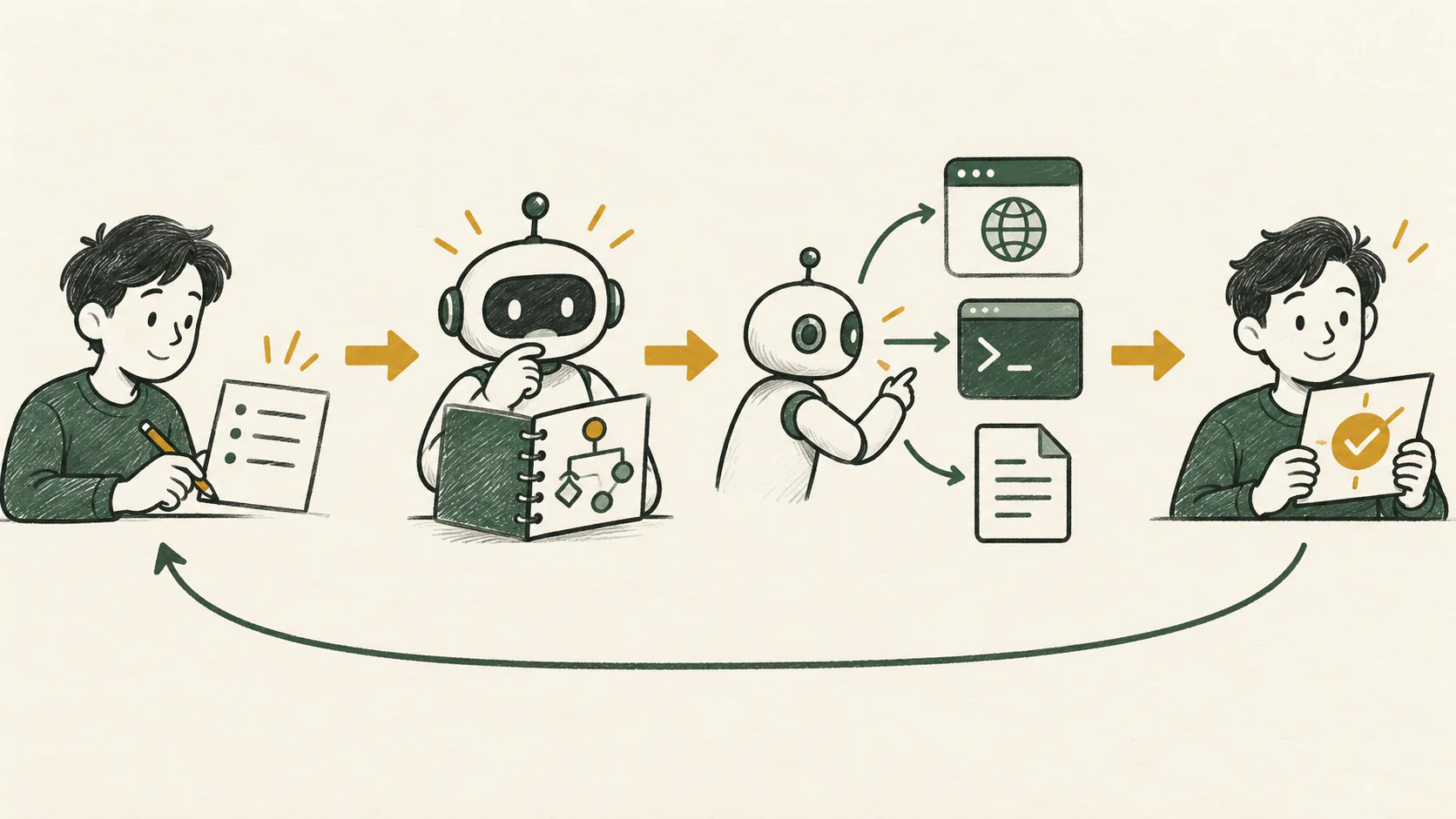
For longer work, give the model a goal, the source material it should trust, constraints, available tools, and a clear definition of done. Ask it to report its plan and unresolved questions before it acts. Then review the output, run tests or other independent checks, and require human confirmation before actions that send messages, spend money, delete data, or change production systems. Meta’s model card also advises deployers to add safeguards appropriate to their use case, including human review for irreversible actions.
Muse Wonder can reason about multimodal inputs, but that does not automatically grant it browser, shell, or application access. A tool-enabled client must expose those capabilities and decide what the model can call. Similarly, function calling produces a proposed tool call; your application still needs to validate the arguments, execute the function, and return its result.
Muse Wonder benchmark: what the launch scores say
Meta’s launch scorecard reports these selected results for Muse Wonder and Muse Wonder Full:
| Benchmark | Muse Wonder | Muse Wonder Full |
|---|---|---|
| Artificial Analysis Intelligence Index v4.3 | 52 | 56 |
| Harvey LAB-AA | 10.0 | 13.1 |
| AutomationBench-AA | 39.1 | 45.4 |
| DeepSWE 1.1 | 78.8 | 79.0 |
| SWE-Marathon | 53.1 | 57.5 (xhigh reasoning) |
These figures describe different evaluations, not a single shared scale. Harvey LAB-AA measures legal work products against task criteria, AutomationBench-AA checks whether simulated business workflows reach required end states, and DeepSWE evaluates software-engineering tasks. A score of 78.8 on DeepSWE cannot be compared numerically with 39.1 on AutomationBench-AA.
The model card says Muse Wonder results use maximum reasoning effort and that the scorecard combines internal and third-party results. Some coding results retain the evaluation vendor’s agent harness, so they are not all controlled head-to-head runs. Treat the Muse Wonder benchmark table as a useful starting point for choosing what to test, not a guarantee that the model will lead on your own codebase, language, or workflow.
Meta also lists limitations: the model can produce inaccurate answers, can make mistakes in unfamiliar multi-step reasoning, and may struggle with precise visual or spatial tasks. Before adopting it, run a small evaluation on examples that resemble your actual work and compare the quality, latency, tool reliability, and total bill with the alternative you would otherwise use.
Muse Wonder cost
Muse Wonder cost depends on where you call it and how many input and output tokens your workload uses. Meta’s published pay-as-you-go rate and the OpenRouter listing are $4 per million input tokens and $20 per million output tokens. OpenRouter lists cached input at $0.20 per million tokens. Cached tokens are billed at the cache-read rate when the request actually qualifies; do not assume all repeated text is cached.
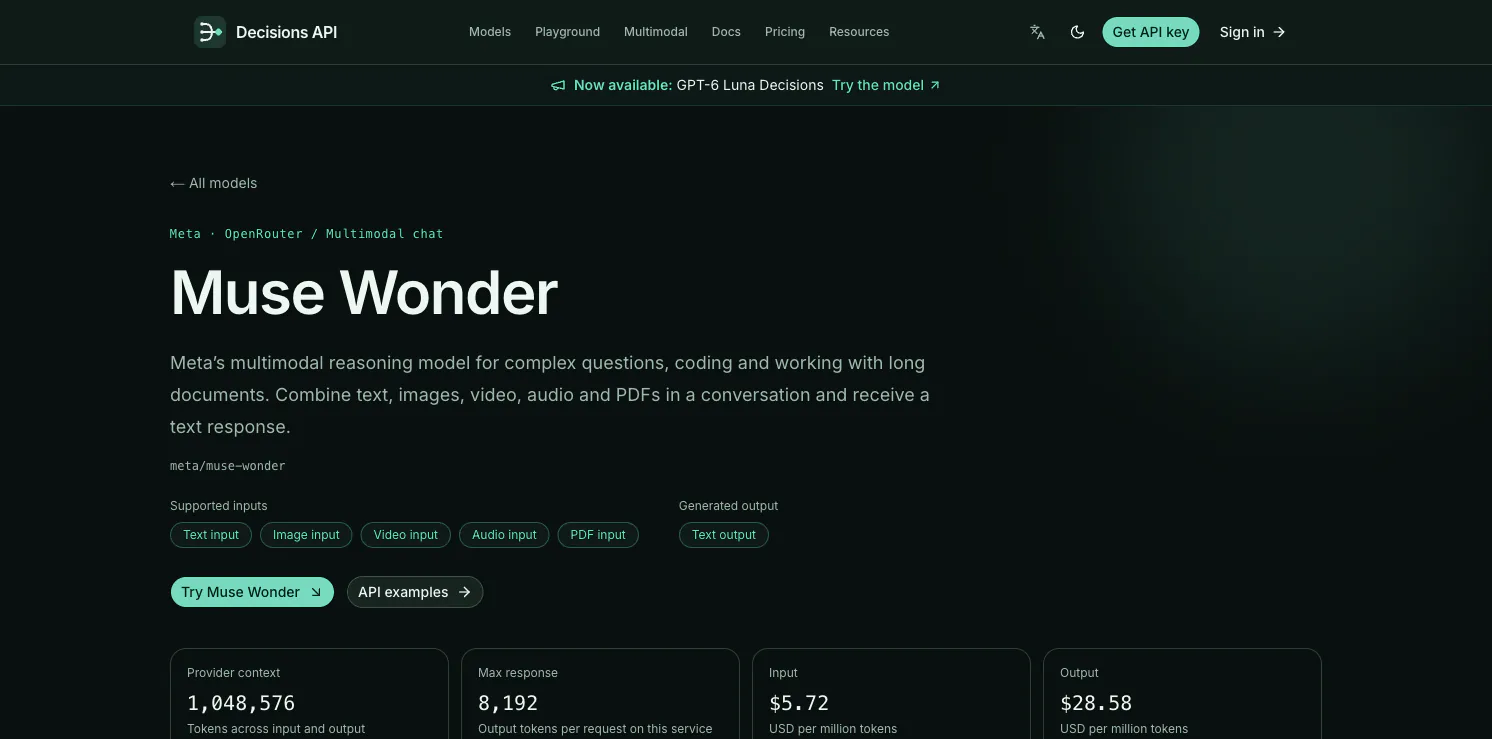
Decisions API displays a separate platform price: $5.72 per million input tokens, $0.29 per million cache-read tokens, and $28.58 per million output tokens. The page says these prices include its 30% gross-margin target. That is the price shown for using Muse Wonder through that service, not the underlying OpenRouter rate.
A simple estimate is:
estimated cost = input tokens / 1,000,000 × input rate
               + output tokens / 1,000,000 × output rate
For example, 10,000 input tokens and 2,000 output tokens cost about $0.08 at the $4/$20 OpenRouter rates, before any other applicable charges. At the Decisions API platform rates, the same token counts cost about $0.11436. Actual requests can vary because previous conversation messages count as input again, cached tokens may use a different rate, and long reasoning or answers can increase output usage. Check the usage returned after each request and set output limits where the client supports them.
Muse Wonder OpenRouter: what the integration changes
OpenRouter provides a common API endpoint and catalog entry for Muse Wonder. You address the model as meta/muse-wonder and use an OpenRouter API key; OpenRouter’s live listing shows Meta as the serving provider and publishes the current model price and context details. This is convenient when your application already uses OpenRouter or needs to compare several model IDs without rewriting its integration each time.
The word “OpenRouter” describes the access layer, not a separate Meta model. The model’s identity and capabilities still come from Meta, and the actual request is subject to the provider and route available at the time. OpenRouter’s shared chat-completions format makes the request familiar, but it does not remove token charges or guarantee that every tool or media feature behaves identically across providers. Read the live model page before relying on a particular input type, parameter, or rate.
Use Muse Wonder on Decisions API
The Decisions API Muse Wonder page offers a playground and an OpenAI-compatible chat-completions endpoint. Its current model ID is meta/muse-wonder. The page shows a 1,048,576-token provider context window, an 8,192-token maximum response, text output, and input support for text, images, video, audio, and PDF files. It also documents service limits of up to 40 messages and 256 KiB of text per request, with a maximum of eight attachments, 4 MiB per file and 8 MiB combined.
To try it interactively, sign in to Decisions API, open the Muse Wonder playground, and enter a prompt or attach supported media. To call it from an application, create a Decisions API key, keep it in an environment variable, and send a request to /v1/chat/completions. Here is a plain-text request that returns a complete response:
curl https://decisions-api.dev/v1/chat/completions \
  -H "Authorization: Bearer $DECISIONS_API_KEY" \
  -H "Content-Type: application/json" \
  -d '{
    "model": "meta/muse-wonder",
    "messages": [
      {"role": "user", "content": "Summarize the key decisions in this project brief and list the evidence for each one."}
    ],
    "max_completion_tokens": 256
  }'
The request uses the service’s model ID and a key created for that service. Its current examples return a non-streaming response; the platform bills input, cached input, and output at their separate displayed rates. For a media request, follow the matching example on the model page and stay within its attachment limits. You can use the playground to inspect token usage and charged credits after a response before wiring the endpoint into a larger workflow.
Muse Wonder is most compelling when a task benefits from long context, multimodal understanding, or sustained work through several steps. Start with a small, measurable workload, pick the access route that fits your stack, and compare the observed quality and total cost with a baseline. The Decisions API page gives you a direct place to try the model and a documented endpoint to move that experiment into code.
Sources
- Meta: Introducing Muse Wonder
- Muse Wonder Model Card
- Meta Model API: Muse Wonder model page and pricing
- Meta Model API model documentation
- OpenRouter: Muse Wonder model and live pricing
- OpenRouter chat-completions API documentation
- Decisions API: Muse Wonder model page, limits, pricing, and API examples
(End)
