Table of Contents
Note
This is just a prototype that is rapidly evolving. This tutorial may become outdated at any time. You can find the latest updated article on the A2AProtocol blog.
My Environment
- Python 3.13
- uv: uv 0.7.2 (Homebrew 2025-04-30)
- Warp
- Ollama 0.6.7 (supports Qwen3)
- macOS Sequoia 15.4.1
A2A SDK Python
Clone the latest code:
git clone git@github.com:google/A2A.git
Create a virtual environment
cd A2A/a2a-python-sdk
# Create virtual environment
uv venv
# Activate
source .venv/bin/activate
Install A2A SDK
uv pip install -e .
Run A2A Server
cd a2a-python-sdk/examples/helloworld

uv run python __main__.py
Output:
⠙ Preparing packages... (16/18)
black      ------------------------------ 481.31 KiB/1.39 MiB
ruff       ------------------------------ 454.19 KiB/9.87 MiB                                                                                                                                                                     Uninstalled 4 packages in 20ms
Installed 25 packages in 40ms
INFO:     Started server process [46538]
INFO:     Waiting for application startup.
INFO:     Application startup complete.
INFO:     Uvicorn running on http://0.0.0.0:9999 (Press CTRL+C to quit)
INFO:     127.0.0.1:49177 - "GET /.well-known/agent.json HTTP/1.1" 200 OK
INFO:     127.0.0.1:49179 - "POST / HTTP/1.1" 200 OK
INFO:     127.0.0.1:49181 - "POST / HTTP/1.1" 200 OK
Run A2A Client
In a new terminal window, activate the venv, navigate to the a2a-python-sdk/examples/helloworld directory, and then execute:
uv run python test_client.py
Output:
{'id': 'd220c3d7335e40478e1745d28d54155f', 'jsonrpc': '2.0', 'result': {'messageId': 'ac094ba7-f56c-41e3-85cf-a813406c65d4', 'parts': [{'text': 'Hello World', 'type': 'text'}], 'role': 'agent'}}
Received an instance of Message, getTask and cancelTask are not applicable for invocation
{'id': '403b8991269b42659d6349f34e8bf579', 'jsonrpc': '2.0', 'result': {'final': False, 'messageId': '0b56aa9d-25ca-4f2a-b397-7247c0081e94', 'parts': [{'text': 'Hello ', 'type': 'text'}], 'role': 'agent'}}
{'id': '403b8991269b42659d6349f34e8bf579', 'jsonrpc': '2.0', 'result': {'final': True, 'messageId': '16dce67d-e4e6-4943-bad9-933412ad94ed', 'parts': [{'text': 'World', 'type': 'text'}], 'role': 'agent'}}
Example completed.
Hello World Explanation
This is a simple A2A (Agent2Agent) SDK example that demonstrates how to create a basic Agent service. The example implements a simple Hello World Agent that can respond to messages and return "Hello World".
Project Structure
helloworld/
├── __main__.py          # Main program entry, configuration and Agent service startup
├── agent_executor.py    # Agent executor implementation
└── test_client.py       # Test client example
Core Components
1. Agent Service Configuration (__main__.py)
- Defines the Agent's skill: a simple "hello_world" skill
- Creates an AgentCard, including the Agent's basic information and capabilities
- Configures and starts the A2A server, listening on
localhost:9999
2. Agent Executor (agent_executor.py)
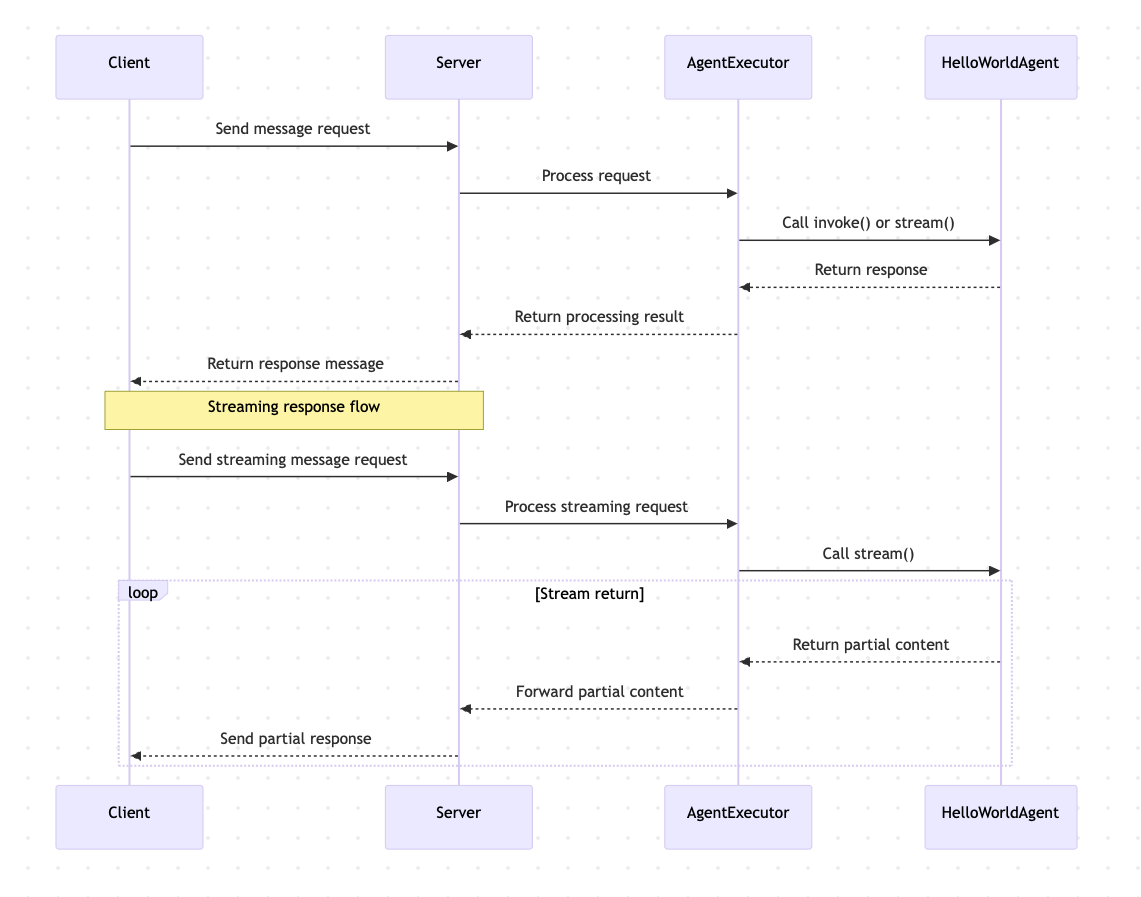
HelloWorldAgentclass: implements basic message handling logicinvoke(): synchronously returns "Hello World"stream(): returns "Hello World" as a stream (in two parts)
HelloWorldAgentExecutorclass: handles various message requests- Supports regular message sending
- Supports streaming messages
- Handles task cancellation and resubscription requests
3. Test Client (test_client.py)
- Demonstrates how to connect to the Agent service
- Shows how to send messages
- Shows how to get task status
- Shows how to cancel tasks
- Shows how to use streaming messages
Workflow
Features
- Basic Message Handling: Able to receive and respond to simple text messages
- Streaming Response: Supports returning message content in chunks
- Task Management: Supports task status queries and cancellation operations
- Error Handling: Includes basic error handling mechanisms
Discover Products
Discover useful AI products and services.
Decisions API brings multiple AI decision models into one workflow for classifying, scoring, routing, and evaluating text with structured outputs.
Build smarter AI workflows with a unified API for classification, scoring, routing, verification, and other structured decisions.
Try Jev AI Model online for free after sign in. Classify, score, and route text with structured results. Buy credits for API access.
The Discord bot maker your server actually needs

Turn any flat image into named, editable layers—separate text, subjects, decorations, and backgrounds in just a few clicks.

Start with a simple prompt, then let our AI OC Maker turn your idea into anime characters, fantasy OCs, roleplay avatars, and full-body character designs.
Related Articles
Explore more content related to this topic
Python A2A: A Comprehensive Guide to Google's Agent2Agent Protocol
Master the Python A2A protocol for building interoperable AI agents. Learn how to create, connect, and orchestrate AI services with standardized communication, from basic echo agents to complex multi-agent workflows.
Building an A2A Currency Agent with LangGraph
This guide provides a detailed explanation of how to build an A2A-compliant agent using LangGraph and the Google Gemini model. We'll walk through the Currency Agent example from the A2A Python SDK, explaining each component, the flow of data, and how the A2A protocol facilitates agent interactions.
A2A Python Sample: Github Agent
How to use a2a-python to Create and Connect Github Agent with Google's Agent2Agent (A2A) Protocol
Implementing CurrencyAgent with A2A Python SDK
A step-by-step guide to building a currency conversion agent with A2A Python SDK. Features detailed implementation of CurrencyAgent, AgentExecutor, and AgentServer components, complete with environment setup, testing, and deployment instructions. Perfect for developers looking to create AI-powered currency conversion services.
Google A2A Python SDK Tutorial
A comprehensive guide to building A2A agents with Python, covering environment setup, agent implementation, server deployment, and advanced features like LLM integration and streaming.