Appearance
A2A Protocol Development Guide
Overview
The A2A (Agent2Agent) protocol is a JSON-RPC based communication protocol designed for agent interactions. This guide provides comprehensive instructions for developing both server and client components that conform to the A2A protocol specification.
Table of Contents
Protocol Basics
The A2A protocol is built on top of JSON-RPC 2.0 and defines a set of methods for agent communication. Key components include:
Message Structure
All A2A messages follow the JSON-RPC 2.0 format with the following base structure:
typescript
interface JSONRPCMessage {
  jsonrpc?: "2.0";
  id?: number | string | null;
  method?: string;
  params?: unknown;
  result?: unknown;
  error?: JSONRPCError;
}Protocol Flow
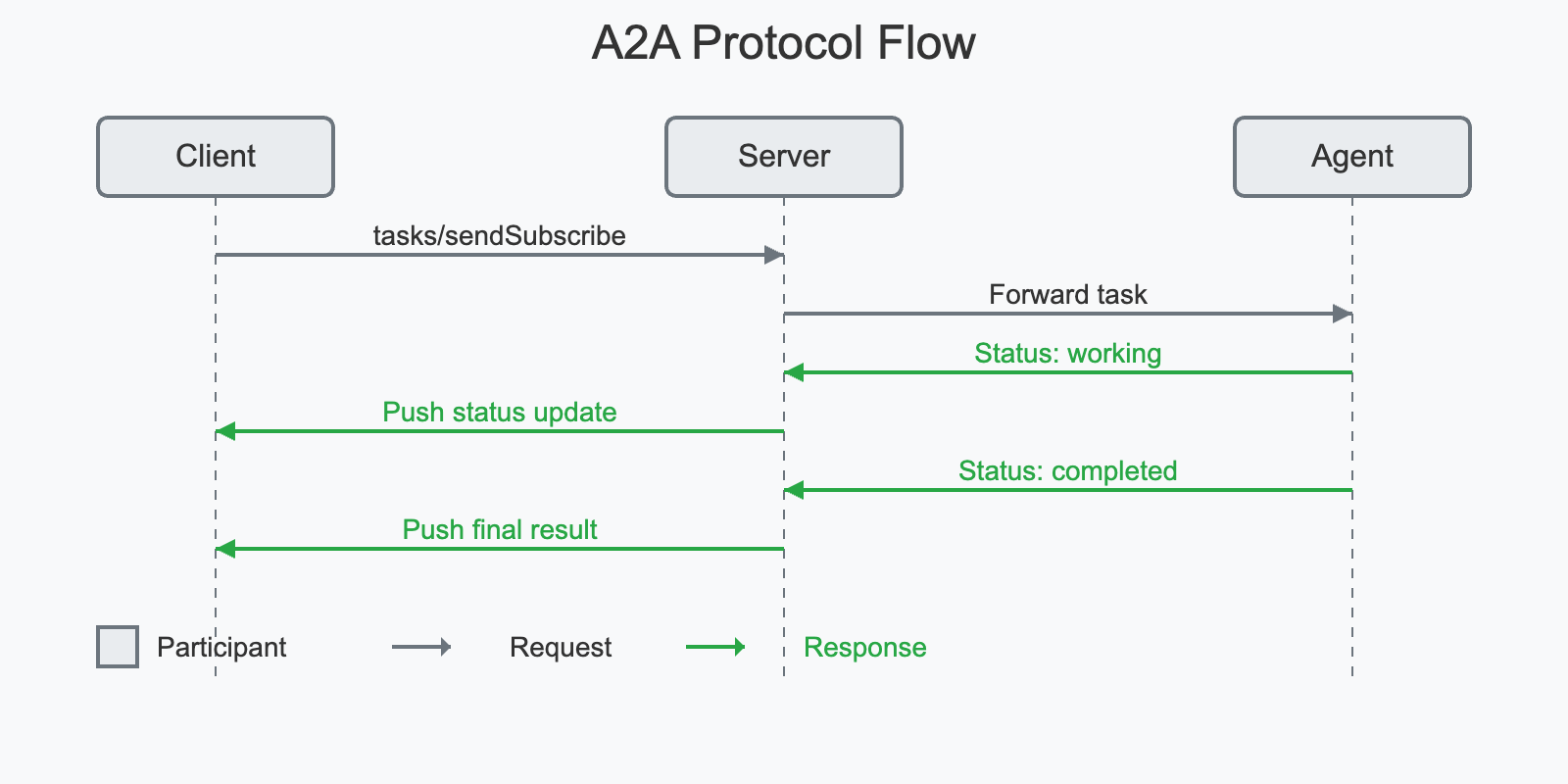
The following sequence diagram illustrates the main interaction flow of the A2A protocol:
Core Methods
The protocol supports several core methods:
tasks/send: Send a task message to an agenttasks/get: Retrieve task statustasks/cancel: Cancel a running tasktasks/pushNotification/set: Configure push notifications for a tasktasks/pushNotification/get: Get push notification configurationtasks/resubscribe: Resubscribe to task updatestasks/sendSubscribe: Send a task message and subscribe to updates
Task States
Tasks can be in one of the following states:
submittedworkinginput-requiredcompletedcanceledfailedunknown
Server Implementation
Core Components
The server implementation consists of several key components:
- Server (server.ts): Main server implementation handling HTTP requests
- Handler (handler.ts): Request handler for processing A2A protocol messages
- Store (store.ts): Task storage and management
- Utils (utils.ts): Utility functions
- Error Handling (error.ts): Error definitions and handling
Basic Usage (Conceptual)
typescript
import {
  A2AServer,
  InMemoryTaskStore,
  TaskContext,
  TaskYieldUpdate,
} from "./index"; // Assuming imports from the server package

// 1. Define your agent's logic as a TaskHandler
async function* myAgentLogic(
  context: TaskContext
): AsyncGenerator<TaskYieldUpdate> {
  console.log(`Handling task: ${context.task.id}`);
  yield {
    state: "working",
    message: { role: "agent", parts: [{ text: "Processing..." }] },
  };

  // Simulate work...
  await new Promise((resolve) => setTimeout(resolve, 1000));

  if (context.isCancelled()) {
    console.log("Task cancelled!");
    yield { state: "canceled" };
    return;
  }

  // Yield an artifact
  yield {
    name: "result.txt",
    mimeType: "text/plain",
    parts: [{ text: `Task ${context.task.id} completed.` }],
  };

  // Yield final status
  yield {
    state: "completed",
    message: { role: "agent", parts: [{ text: "Done!" }] },
  };
}

// 2. Create and start the server
const store = new InMemoryTaskStore(); // Or new FileStore()
const server = new A2AServer(myAgentLogic, { taskStore: store });

server.start(); // Starts listening on default port 41241

console.log("A2A Server started.");Client Implementation
Key Features:
- JSON-RPC Communication: Handles sending requests and receiving responses (both standard and streaming via Server-Sent Events) according to the JSON-RPC 2.0 specification.
- A2A Methods: Implements standard A2A methods like
sendTask,sendTaskSubscribe,getTask,cancelTask,setTaskPushNotification,getTaskPushNotification, andresubscribeTask. - Error Handling: Provides basic error handling for network issues and JSON-RPC errors.
- Streaming Support: Manages Server-Sent Events (SSE) for real-time task updates (
sendTaskSubscribe,resubscribeTask). - Extensibility: Allows providing a custom
fetchimplementation for different environments (e.g., Node.js).
Basic Usage
typescript
import { A2AClient, Task, TaskQueryParams, TaskSendParams } from "./client"; // Import necessary types
import { v4 as uuidv4 } from "uuid"; // Example for generating task IDs

const client = new A2AClient("http://localhost:41241"); // Replace with your server URL

async function run() {
  try {
    // Send a simple task (pass only params)
    const taskId = uuidv4();
    const sendParams: TaskSendParams = {
      id: taskId,
      message: { role: "user", parts: [{ text: "Hello, agent!" }] },
    };
    // Method now returns Task | null directly
    const taskResult: Task | null = await client.sendTask(sendParams);
    console.log("Send Task Result:", taskResult);

    // Get task status (pass only params)
    const getParams: TaskQueryParams = { id: taskId };
    // Method now returns Task | null directly
    const getTaskResult: Task | null = await client.getTask(getParams);
    console.log("Get Task Result:", getTaskResult);
  } catch (error) {
    console.error("A2A Client Error:", error);
  }
}

run();Streaming Usage
typescript
import {
  A2AClient,
  TaskStatusUpdateEvent,
  TaskArtifactUpdateEvent,
  TaskSendParams, // Use params type directly
} from "./client"; // Adjust path if necessary
import { v4 as uuidv4 } from "uuid";

const client = new A2AClient("http://localhost:41241");

async function streamTask() {
  const streamingTaskId = uuidv4();
  try {
    console.log(`\n--- Starting streaming task ${streamingTaskId} ---`);
    // Construct just the params
    const streamParams: TaskSendParams = {
      id: streamingTaskId,
      message: { role: "user", parts: [{ text: "Stream me some updates!" }] },
    };
    // Pass only params to the client method
    const stream = client.sendTaskSubscribe(streamParams);

    // Stream now yields the event payloads directly
    for await (const event of stream) {
      // Type guard to differentiate events based on structure
      if ("status" in event) {
        // It's a TaskStatusUpdateEvent
        const statusEvent = event as TaskStatusUpdateEvent; // Cast for clarity
        console.log(
          `[${streamingTaskId}] Status Update: ${statusEvent.status.state} - ${
            statusEvent.status.message?.parts[0]?.text ?? "No message"
          }`
        );
        if (statusEvent.final) {
          console.log(`[${streamingTaskId}] Stream marked as final.`);
          break; // Exit loop when server signals completion
        }
      } else if ("artifact" in event) {
        // It's a TaskArtifactUpdateEvent
        const artifactEvent = event as TaskArtifactUpdateEvent; // Cast for clarity
        console.log(
          `[${streamingTaskId}] Artifact Update: ${
            artifactEvent.artifact.name ??
            `Index ${artifactEvent.artifact.index}`
          } - Part Count: ${artifactEvent.artifact.parts.length}`
        );
        // Process artifact content (e.g., artifactEvent.artifact.parts[0].text)
      } else {
        console.warn("Received unknown event structure:", event);
      }
    }
    console.log(`--- Streaming task ${streamingTaskId} finished ---`);
  } catch (error) {
    console.error(`Error during streaming task ${streamingTaskId}:`, error);
  }
}

streamTask();Running the Coder Demo
The Coder Demo is an example implementation of an A2A agent that can process code-related tasks.
Setup
- Install dependencies:
bash
git clone https://github.com/sing1ee/a2a-agent-coder.git
#or
git clone git@github.com:sing1ee/a2a-agent-coder.git

bun install- Ensure you have the required environment variables:
bash
# set .env first
export $(cat .env | xargs)Running the Demo
- Start the a2a server (requires Node.js environment):
bash
bun run agents:coder- Start the a2a client:
bash
bun run a2a:cli

# result
$ bun x tsx src/cli.ts
A2A Terminal Client
Agent URL: http://localhost:41241
Attempting to fetch agent card from: http://localhost:41241/.well-known/agent.json
✓ Agent Card Found:
  Name:        Coder Agent
  Description: An agent that generates code based on natural language instructions and streams file outputs.
  Version:     0.0.1
Starting Task ID: a1a608b3-3015-4404-a83f-6ccc05083761
Enter messages, or use '/new' to start a new task.
Coder Agent > You: implement binary search
Sending...

Coder Agent [4:28:00 PM]: ⏳ Status: working
  Part 1: 📝 Text: Generating code...

Coder Agent [4:28:02 PM]: ⏳ Status: working
  Part 1: 📄 File: Name: src/algorithms/binary_search.py, Source: """
Implementation of the binary search algorithm in Python.
"""

def binary_search(arr, target):
    """
    Performs a binary search on a sorted array to find the index of a target value.

    Args:
        arr (list): A sorted list of elements.
        target: The value to search for in the array.

    Returns:
        int: The index of the target value if found, otherwise -1.
    """
    low = 0
    high = len(arr) - 1

    while low <= high:
        mid = (low + high) // 2  # Integer division to find the middle index

        if arr[mid] == target:
            return mid  # Target found at index mid
        elif arr[mid] < target:
            low = mid + 1  # Target is in the right half
        else:
            high = mid - 1  # Target is in the left half

    return -1  # Target not found in the array


Coder Agent [4:28:02 PM]: ✅ Status: completed
SSE stream finished for method tasks/sendSubscribe.
--- End of response for this input ---
Coder Agent > You:
Exiting terminal client. Goodbye!Error Handling
The A2A protocol defines several standard error codes:
-32700: Parse error-32600: Invalid request-32601: Method not found-32602: Invalid params-32603: Internal error-32000: Task not found-32001: Task not cancelable-32002: Push notification not supported-32003: Unsupported operation
Best Practices
- Error Handling: Always implement proper error handling for all A2A protocol methods
- Authentication: Implement proper authentication mechanisms for secure communication
- Task Management: Maintain proper task state management and cleanup
- Push Notifications: Implement push notifications for real-time updates when supported
- Logging: Implement comprehensive logging for debugging and monitoring
Additional Resources
- JSON-RPC 2.0 Specification
- A2A Protocol Schema
- Server Implementation
- Client Implementation
- Coder Agent Implementation
Related Articles
- Python A2A: A Comprehensive Guide to Google's Agent2Agent Protocol
- A2A Sample Methods and JSON Responses
- Understanding A2A Protocol: A Comprehensive Guide
Goto A2A