Appearance
A2A LangGraph Tutorial 20250513
This guide provides a detailed explanation of how to build an A2A-compliant agent using LangGraph and the Google Gemini model. We'll walk through the Currency Agent example from the A2A Python SDK, explaining each component, the flow of data, and how the A2A protocol facilitates agent interactions.
Table of Contents
- Overview
- Architecture
- Setup and Installation
- Components Explained
- Flow of Execution
- Client Interaction
- Advanced Features
- Next Steps
Overview
The Currency Agent is a specialized agent that helps with currency conversions. It leverages:
- A2A Protocol: For standardized communication
- LangGraph: For orchestrating the agent's reasoning
- Google's Gemini Model: As the reasoning engine
- External API: To fetch real-time exchange rates
This example demonstrates several important A2A capabilities:
- Streaming responses for real-time updates
- Multi-turn conversations for clarification
- Task state management
- Integration with an LLM
Architecture
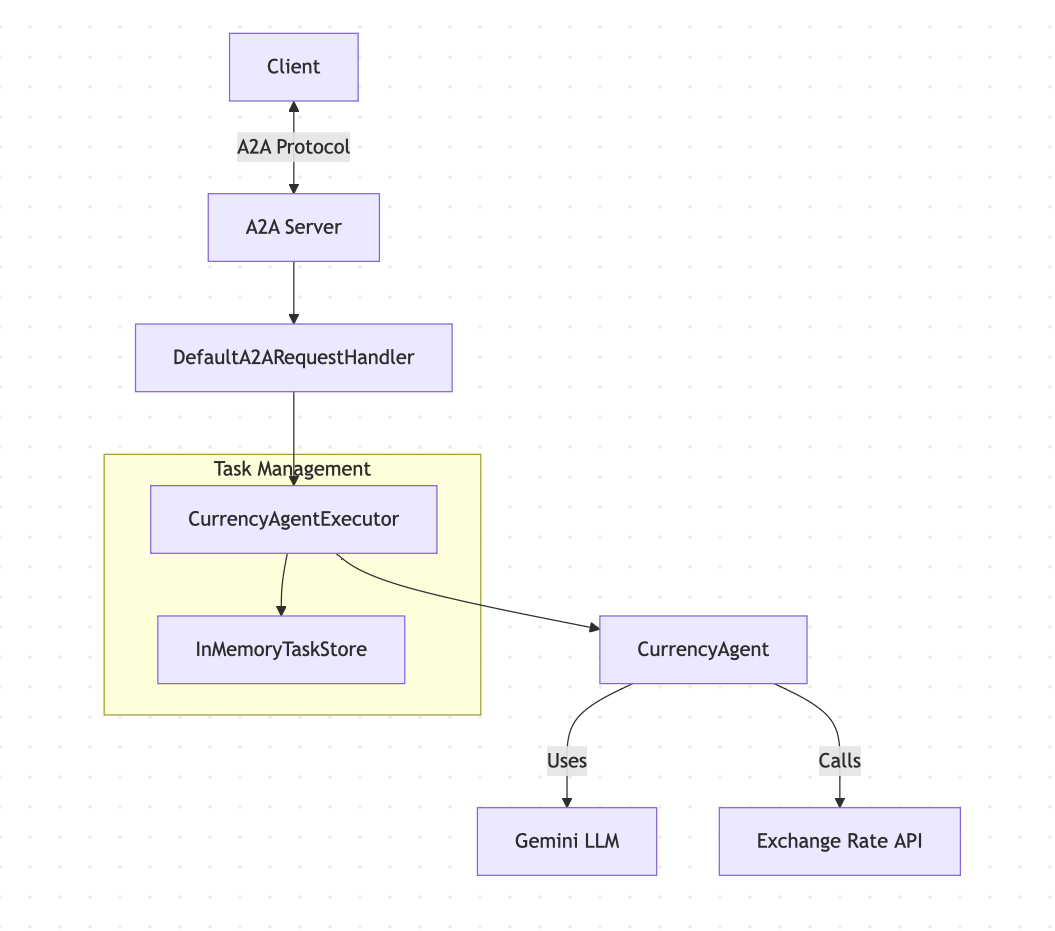
Here's the high-level architecture of the Currency Agent:
Setup and Installation
To run this example, you'll need:
- Python 3.10 or higher
- A Gemini API key
First, clone the A2A repository and install the dependencies:
bash
git clone https://github.com/google/A2A.git -b main --depth 1
cd A2A/a2a-python-sdk
python -m venv .venv
source .venv/bin/activate  # On Windows: .venv\Scripts\activate
pip install -e .[dev]Then, create a .env file in the examples/langgraph/ directory:
bash
echo "GOOGLE_API_KEY=YOUR_API_KEY_HERE" > a2a-python-sdk/examples/langgraph/.envComponents Explained
Let's explore each component of the Currency Agent in detail:
Agent Card and Skills
The agent card defines the agent's identity, capabilities, and skills. It's created in __main__.py:
python
def get_agent_card(host: str, port: int):
    """Returns the Agent Card for the Currency Agent."""
    capabilities = AgentCapabilities(streaming=True, pushNotifications=True)
    skill = AgentSkill(
        id='convert_currency',
        name='Currency Exchange Rates Tool',
        description='Helps with exchange values between various currencies',
        tags=['currency conversion', 'currency exchange'],
        examples=['What is exchange rate between USD and GBP?'],
    )
    return AgentCard(
        name='Currency Agent',
        description='Helps with exchange rates for currencies',
        url=f'http://{host}:{port}/',
        version='1.0.0',
        defaultInputModes=CurrencyAgent.SUPPORTED_CONTENT_TYPES,
        defaultOutputModes=CurrencyAgent.SUPPORTED_CONTENT_TYPES,
        capabilities=capabilities,
        skills=[skill],
        authentication=AgentAuthentication(schemes=['public']),
)Key points:
- The agent has a single skill:
convert_currency - It supports streaming (
capabilities.streaming=True) - It accepts and returns text content types
- It uses public authentication (no auth required)
Currency Agent
The CurrencyAgent class in agent.py contains the core logic of the agent:
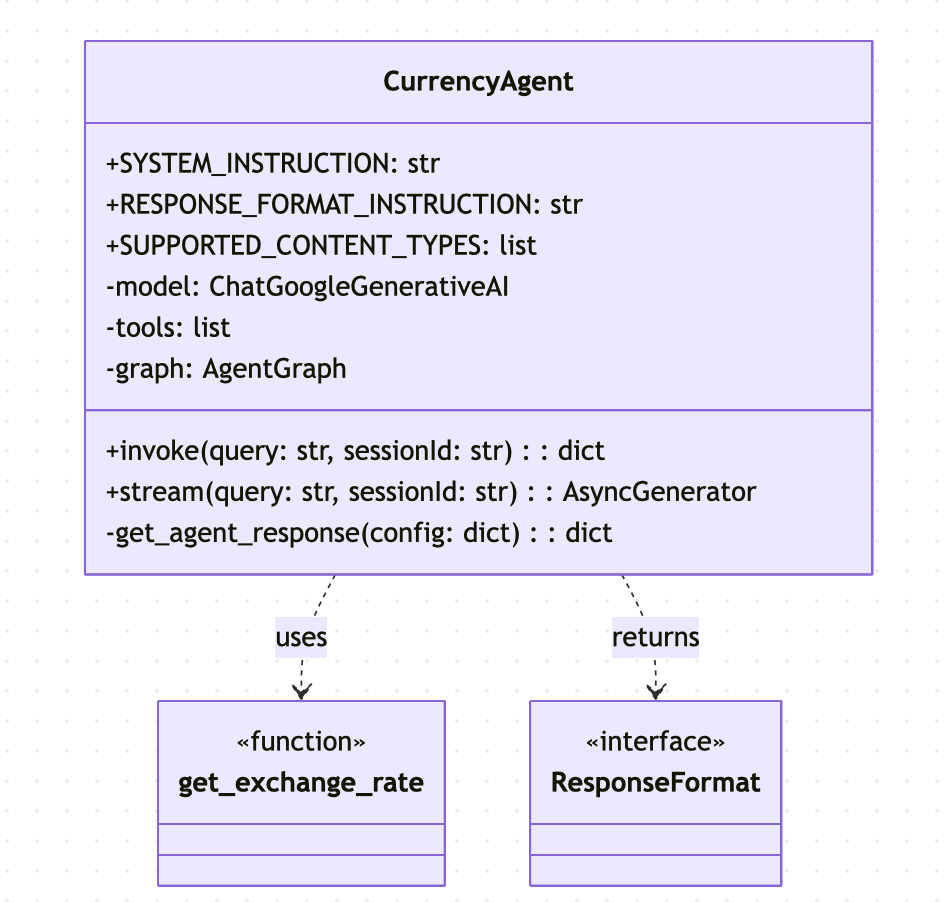
The core functionality includes:
- Tool Definition: The
get_exchange_ratetool fetches real-time exchange rates from an external API:
python
@tool
def get_exchange_rate(
    currency_from: str = 'USD',
    currency_to: str = 'EUR',
    currency_date: str = 'latest',
):
    """Use this to get current exchange rate."""
    try:
        response = httpx.get(
            f'https://api.frankfurter.app/{currency_date}',
            params={'from': currency_from, 'to': currency_to},
        )
        response.raise_for_status()

        data = response.json()
        # ... error handling code
        return data
    except httpx.HTTPError as e:
return {'error': f'API request failed: {e}'}- Agent Definition: The agent is created using LangGraph's
create_react_agent:
python
def __init__(self):
    self.model = ChatGoogleGenerativeAI(model='gemini-2.0-flash')
    self.tools = [get_exchange_rate]

    self.graph = create_react_agent(
        self.model,
        tools=self.tools,
        checkpointer=memory,
        prompt=self.SYSTEM_INSTRUCTION,
        response_format=(self.RESPONSE_FORMAT_INSTRUCTION, ResponseFormat),
)- Response Format: A structured format for agent responses:
python
class ResponseFormat(BaseModel):
    """Respond to the user in this format."""
    status: Literal['input_required', 'completed', 'error'] = 'input_required'
message: str- Invocation Methods: Methods for direct invocation and streaming:
python
def invoke(self, query: str, sessionId: str) -> dict[str, Any]:
    config: RunnableConfig = {'configurable': {'thread_id': sessionId}}
    self.graph.invoke({'messages': [('user', query)]}, config)
    return self.get_agent_response(config)

async def stream(
    self, query: str, sessionId: str
) -> AsyncIterable[dict[str, Any]]:
    inputs: dict[str, Any] = {'messages': [('user', query)]}
    config: RunnableConfig = {'configurable': {'thread_id': sessionId}}

    for item in self.graph.stream(inputs, config, stream_mode='values'):
        message = item['messages'][-1]
        if isinstance(message, AIMessage) and message.tool_calls:
            yield {
                'is_task_complete': False,
                'require_user_input': False,
                'content': 'Looking up the exchange rates...',
            }
        elif isinstance(message, ToolMessage):
            yield {
                'is_task_complete': False,
                'require_user_input': False,
                'content': 'Processing the exchange rates..',
            }

yield self.get_agent_response(config)Agent Executor
The CurrencyAgentExecutor in agent_executor.py adapts the LangGraph agent to the A2A protocol:
python
class CurrencyAgentExecutor(BaseAgentExecutor):
    """Currency AgentExecutor Example."""

    def __init__(self):
        self.agent = CurrencyAgent()

    @override
    async def on_message_send(
        self,
        request: SendMessageRequest,
        event_queue: EventQueue,
        task: Task | None,
    ) -> None:
        """Handler for 'message/send' requests."""
        params: MessageSendParams = request.params
        query = self._get_user_query(params)

        if not task:
            task = create_task_obj(params)

        # invoke the underlying agent
        agent_response: dict[str, Any] = self.agent.invoke(
            query, task.contextId
        )
        update_task_with_agent_response(task, agent_response)
        event_queue.enqueue_event(task)

    @override
    async def on_message_stream(
        self,
        request: SendStreamingMessageRequest,
        event_queue: EventQueue,
        task: Task | None,
    ) -> None:
        """Handler for 'message/stream' requests."""
        params: MessageSendParams = request.params
        query = self._get_user_query(params)

        if not task:
            task = create_task_obj(params)
            # emit the initial task so it is persisted to TaskStore
            event_queue.enqueue_event(task)

        # kickoff the streaming agent and process responses
        async for item in self.agent.stream(query, task.contextId):
            task_artifact_update_event, task_status_event = (
                process_streaming_agent_response(task, item)
            )

            if task_artifact_update_event:
                event_queue.enqueue_event(task_artifact_update_event)

            event_queue.enqueue_event(task_status_event)

    def _get_user_query(self, task_send_params: MessageSendParams) -> str:
        """Helper to get user query from task send params."""
        part = task_send_params.message.parts[0].root
        if not isinstance(part, TextPart):
            raise ValueError('Only text parts are supported')
return part.textThis executor implements two primary methods:
on_message_send: Handles synchronous requests and returns a complete responseon_message_stream: Handles streaming requests and emits events as they occur
Helpers
The helpers.py file contains utility functions for managing tasks and transforming agent responses into A2A protocol events:
python
def update_task_with_agent_response(
    task: Task, agent_response: dict[str, Any]
) -> None:
    """Updates the provided task with the agent response."""
    task.status.timestamp = datetime.now().isoformat()
    parts: list[Part] = [Part(TextPart(text=agent_response['content']))]
    if agent_response['require_user_input']:
        task.status.state = TaskState.input_required
        message = Message(
            messageId=str(uuid4()),
            role=Role.agent,
            parts=parts,
        )
        task.status.message = message
        if not task.history:
            task.history = []

        task.history.append(message)
    else:
        task.status.state = TaskState.completed
        task.status.message = None
        if not task.artifacts:
            task.artifacts = []

        artifact: Artifact = Artifact(parts=parts, artifactId=str(uuid4()))
        task.artifacts.append(artifact)

def process_streaming_agent_response(
    task: Task,
    agent_response: dict[str, Any],
) -> tuple[TaskArtifactUpdateEvent | None, TaskStatusUpdateEvent]:
    """Processes the streaming agent responses and returns TaskArtifactUpdateEvent and TaskStatusUpdateEvent."""
    is_task_complete = agent_response['is_task_complete']
    require_user_input = agent_response['require_user_input']
    parts: list[Part] = [Part(TextPart(text=agent_response['content']))]

    end_stream = False
    artifact = None
    message = None

    # responses from this agent can be working/completed/input-required
    if not is_task_complete and not require_user_input:
        task_state = TaskState.working
        message = Message(role=Role.agent, parts=parts, messageId=str(uuid4()))
    elif require_user_input:
        task_state = TaskState.input_required
        message = Message(role=Role.agent, parts=parts, messageId=str(uuid4()))
        end_stream = True
    else:
        task_state = TaskState.completed
        artifact = Artifact(parts=parts, artifactId=str(uuid4()))
        end_stream = True

    task_artifact_update_event = None

    if artifact:
        task_artifact_update_event = TaskArtifactUpdateEvent(
            taskId=task.id,
            contextId=task.contextId,
            artifact=artifact,
            append=False,
            lastChunk=True,
        )

    task_status_event = TaskStatusUpdateEvent(
        taskId=task.id,
        contextId=task.contextId,
        status=TaskStatus(
            state=task_state,
            message=message,
            timestamp=datetime.now().isoformat(),
        ),
        final=end_stream,
    )

return task_artifact_update_event, task_status_eventThe key functions transform the agent's internal response format into the A2A protocol's event model.
Flow of Execution
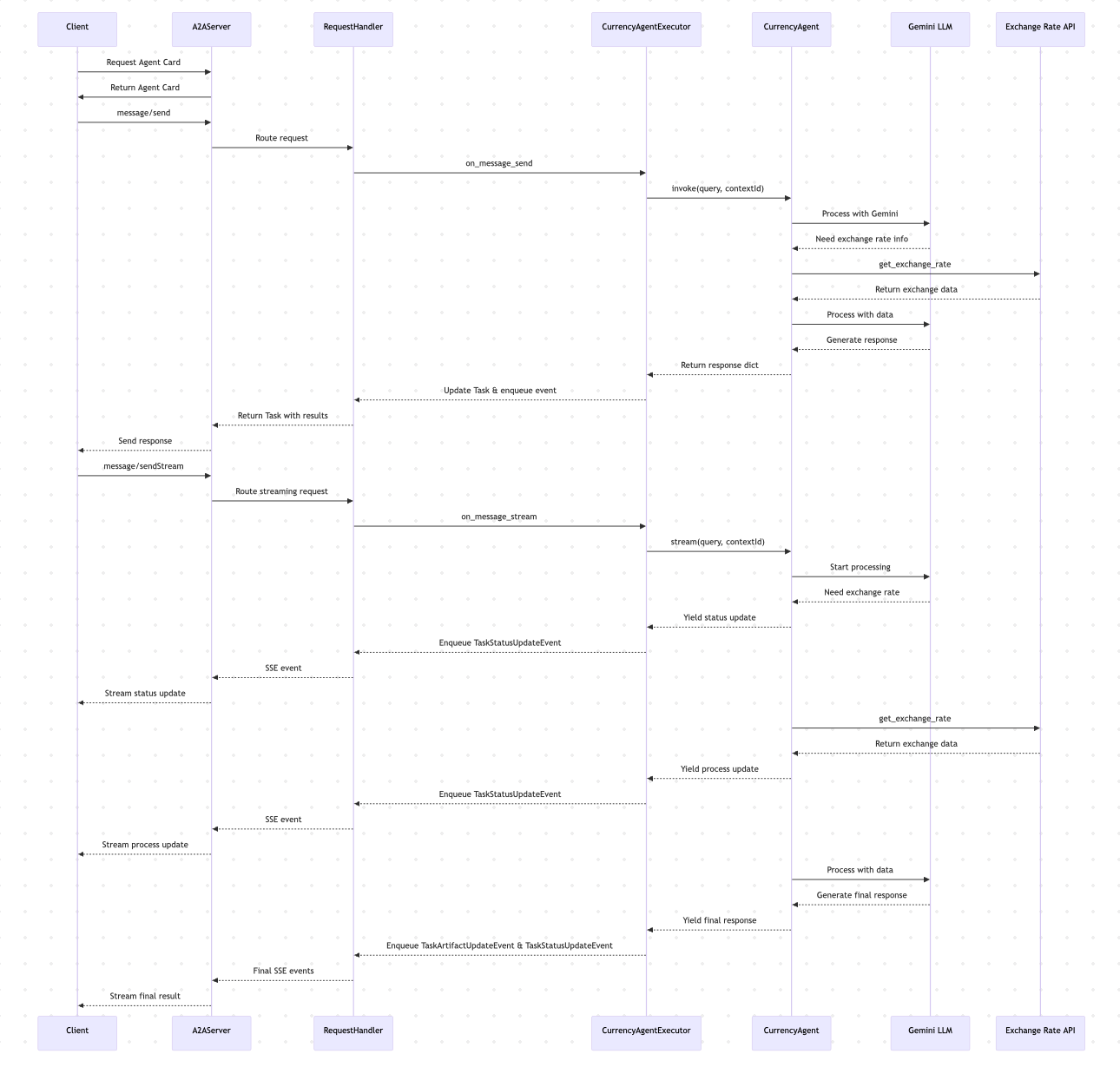
Let's visualize the entire flow of execution when a client interacts with the Currency Agent:
Client Interaction
The test_client.py script demonstrates how to interact with the agent through the A2A protocol:
python
async def run_single_turn_test(client: A2AClient) -> None:
    """Runs a single-turn non-streaming test."""
    send_payload = create_send_message_payload(
        text='how much is 100 USD in CAD?'
    )
    # Send Message
    send_response: SendMessageResponse = await client.send_message(
        payload=send_payload
    )
    print_json_response(send_response, 'Single Turn Request Response')

    # Query the task if needed
    if isinstance(send_response.root, SendMessageSuccessResponse) and \
       isinstance(send_response.root.result, Task):
        task_id: str = send_response.root.result.id
        task_id_payload = {'id': task_id}
        get_response: GetTaskResponse = await client.get_task(
            payload=task_id_payload
        )
        print_json_response(get_response, 'Query Task Response')

async def run_streaming_test(client: A2AClient) -> None:
    """Runs a single-turn streaming test."""
    send_payload = create_send_message_payload(
        text='how much is 50 EUR in JPY?'
    )
    print('--- Single Turn Streaming Request ---')
    stream_response = client.send_message_streaming(payload=send_payload)
    async for chunk in stream_response:
        print_json_response(chunk, 'Streaming Chunk')

async def run_multi_turn_test(client: A2AClient) -> None:
    """Runs a multi-turn non-streaming test."""
    print('--- Multi-Turn Request ---')
    # --- First Turn ---
    first_turn_payload = create_send_message_payload(
        text='how much is 100 USD?'
    )
    first_turn_response: SendMessageResponse = await client.send_message(
        payload=first_turn_payload
    )
    print_json_response(first_turn_response, 'Multi-Turn: First Turn Response')

    context_id: str | None = None
    if isinstance(first_turn_response.root, SendMessageSuccessResponse) and \
       isinstance(first_turn_response.root.result, Task):
        task: Task = first_turn_response.root.result
        context_id = task.contextId  # Capture context ID

        # --- Second Turn (if input required) ---
        if task.status.state == TaskState.input_required and context_id:
            print('--- Multi-Turn: Second Turn (Input Required) ---')
            second_turn_payload = create_send_message_payload(
                'in GBP', task.id, context_id
            )
            second_turn_response = await client.send_message(
                payload=second_turn_payload
            )
            print_json_response(
                second_turn_response, 'Multi-Turn: Second Turn Response'
)Advanced Features
Streaming
The Currency Agent supports streaming responses, allowing it to provide real-time updates as it processes the request:
- When the agent starts thinking, it sends an "in progress" update
- When it calls the exchange rate API, it streams an update
- When processing the data, it streams another update
- Finally, it sends the completed result
This provides a better user experience for operations that might take time to complete.
Multi-turn Conversations
The agent can engage in multi-turn conversations when it needs more information:
- If the user asks "How much is 100 USD?" without specifying the target currency
- The agent sets the task state to
TaskState.input_required - The client can then send a follow-up message with the same
contextId - The agent maintains context between turns
Example conversation:
User: How much is 100 USD?
Agent: To which currency would you like to convert 100 USD?
User: in GBP
Agent: 100 USD is approximately 78.45 GBP according to the current exchange rate.Next Steps
Now that you understand how the Currency Agent works, you can:
- Try different queries: Test with various currency pairs
- Modify the agent: Add support for more features
- Historical exchange rates
- Currency trends analysis
- Support for more currencies
- Extend the architecture:
- Implement persistent
TaskStorefor long-lived sessions - Add authentication mechanisms
- Deploy the agent to a production environment
- Implement persistent
For more information on A2A protocol features:
Related Articles
- Understanding A2A Protocol - A detailed guide to the fundamentals of the A2A protocol
- A2A vs MCP: A Comprehensive Comparison - An in-depth comparison between A2A and MCP protocols
- Python A2A Tutorial with Source Code - Hands-on implementation guide for A2A protocol in Python
- A2A Sample Methods and JSON Responses - Reference guide for A2A protocol methods and response formats
Go A2A