Settingchuan – Official Website, What It Is & How to Use
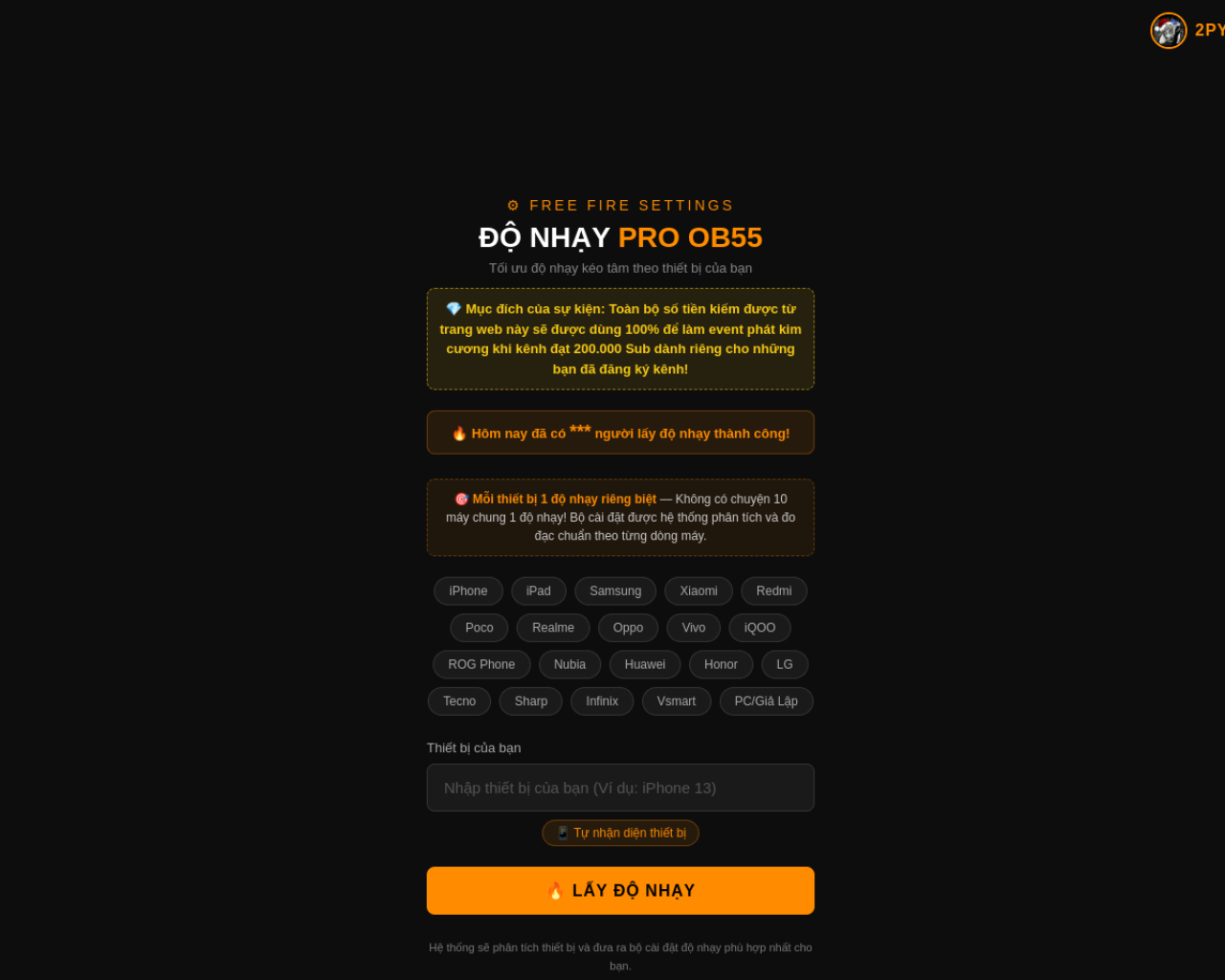
Settingchuan Official Website
Settingchuan (from Vietnamese setting chuẩn, "correct settings") is a free Vietnamese-language web tool that generates Free Fire sensitivity settings for your exact phone model — branded on-site as "ĐỘ NHẠY PRO OB55".
- Official app: https://settingchuan.vercel.app
- Creator: MinhMod (contact via Telegram: t.me/hongmink188; in-site assistant goes by "2PY")
- Price: Free — monetized through link tasks; no payment asked on the site
- Login required: No — no account, no sign-up
- Platform: Web (free Vercel subdomain), Vietnamese language only
- Main use: Getting per-device Free Fire sensitivity numbers (general, red dot, scope, DPI-style drag tuning) for the OB55 patch
- Last checked: September 27, 2026
We are not the official developer of Settingchuan. This page helps users find, understand, and use the product. The tool is a fan-made project and is not affiliated with Garena or Free Fire.
What Is Settingchuan?
Free Fire players obsess over độ nhạy — sensitivity — because the difference between a missed spray and an "auto headshot" drag often comes down to values tuned for your specific screen and refresh rate. Settingchuan automates that tuning. You pick your device brand (the tabs cover iPhone, iPad, Samsung, Xiaomi, Redmi, Poco, Realme, Oppo, Vivo, iQOO, ROG Phone, Nubia, Huawei, Honor, LG, Tecno, Sharp, Infinix, Vsmart, and even PC emulators), enter your exact model — or hit auto-detect (Tự nhận diện thiết bị) — and the site generates a sensitivity profile it claims is unique per device ("Mỗi thiết bị 1 độ nhạy riêng biệt").
The practical reality of using it:
- The output is a settings sheet, not a file. You still open Free Fire → Settings → Sensitivity and move the sliders yourself; the site just tells you the numbers to aim for.
- The results sit behind a link task. After clicking "🔥 Lấy Độ Nhạy", you don't see the settings immediately — you're routed through a keyword-search/task page (the site advertises a 1–2 minute "vượt link" flow, with a Google Drive video tutorial). Completing it redirects you back to your results. This is the site's monetization and the main friction point.
- Device accuracy matters. The site itself warns that entering a device that isn't in its database returns wrong sensitivity — so auto-detect or the exact model name beats guessing.
- Version churn is real. The branding tracks Free Fire's patch cycle (currently OB55); when Garena ships OB56 and reworks recoil, per-device numbers drift and the tool needs updating.
So compared with a static "best sensitivity" blog post, Settingchuan's value is the per-device lookup; compared with a paid sensitivity app, it's free but costs you a link task instead of money.
How to Use Settingchuan
- Open the official Settingchuan website (Vietnamese interface).
- Tap the tab for your device brand, type your model in the search box, or use Tự nhận diện thiết bị (auto-detect).
- Click 🔥 Lấy Độ Nhạy (Get Sensitivity).
- Complete the link-task flow shown next (search the given keyword on the task page; the site says 1–2 minutes) — you'll be redirected back to your sensitivity results.
- Open Free Fire → Settings → Sensitivity, and enter the returned values slider by slider.
If your model isn't found, the site offers manual entry plus a support contact (Telegram), and an in-page "2PY" chat with a Tính & Gửi Số (calculate and send) option.
Is Settingchuan Safe?
Here is what can and can't be verified:
- No account, no credentials. The tool never asks you to register, and it doesn't need your Free Fire ID, password, or login of any kind. A sensitivity generator only needs your phone model — if any page in the flow asks for your game account, close it: that would be phishing, not this tool.
- The link-task flow is third-party. The "vượt link" step sends you to external task/survey pages that pay the site owner. Treat those pages with the usual caution — don't install apps you don't trust, don't enter personal or payment information, and stop if a task escalates into something sketchy. The site claims all earnings fund Free Fire diamond giveaways for the community.
- Unofficial fan project. It runs on a free
vercel.appsubdomain, is Vietnamese-only, and is not affiliated with Garena. Using it won't get you banned (you're only reading numbers and typing them into the game), but there's no official support either. - No payment requested on the site itself. Free to use end to end — the "cost" is the completed task.
Nothing observed suggests malware on the official domain itself, but as with any link-shortener-monetized site, the safest posture is: use the official URL, never enter game credentials anywhere, and bail out of tasks that feel wrong.
Why Is Settingchuan Popular?
Free Fire Vietnam runs on Facebook-group culture: pages and groups constantly post per-model "độ nhạy full đỏ" configs, and Settingchuan's URL is being pasted directly into those posts as the go-to lookup for Samsung, Oppo, iPhone, and Redmi models in 2026. The tool also feeds a YouTube promotion loop — the creator's channel videos walk through it, and the site promises diamond giveaway events once the channel hits 200,000 subscribers, which keeps viewers circulating back to the site. The daily counter on the homepage ("Hôm nay đã có … người lấy độ nhạy thành công!") reinforces the same loop.
Settingchuan appears to be spreading through Vietnamese Free Fire Facebook groups and YouTube channels rather than any official channel; there is no single public source pinpointing where it started.
Settingchuan Not Working?
- Refresh the page — the tool is client-heavy and occasionally needs a reload (the in-site chat even has an F5 button).
- If the link task won't complete or redirect you back, redo it in another browser; ad blockers commonly break task redirects — temporarily disabling them for the flow sometimes helps.
- Check your device entry: a model not in the database returns wrong sensitivity rather than an error, so use auto-detect when possible.
- After a new Free Fire patch (OB56+), numbers may be stale until the site updates its branding and data — retry later.
- Still stuck? Message the creator on Telegram (t.me/hongmink188) or use the in-page 2PY chat.
Settingchuan was online and generating results as of September 27, 2026.
Settingchuan Alternatives
- "Độ Nhạy Pro" / "FF Settings" Android apps (Google Play) — same per-model sensitivity lookup without the link-task detour, at the cost of installing an app.
- Vietnamese gaming guides (taimienphi.vn, download.com.vn) — written per-patch sensitivity walkthroughs with copy-paste numbers; no tasks, updated each OB.
- Pro-player configs shared on Facebook/YouTube — settings actually used by known players (C4, LMC, RuokFF and similar), best if you want a proven baseline to tweak from.
Frequently Asked Questions
What is the official Settingchuan website?
The official website is https://settingchuan.vercel.app — a free Vercel-hosted web app. Beware lookalike domains; the tool only ever exists at that address.
Is Settingchuan free?
Yes. There's no payment and no subscription — but results are gated behind a link task (survey/keyword flow) that monetizes the site. The creator claims those earnings fund community diamond giveaways.
Do I need an account to use Settingchuan?
No. No registration, no login, and no Free Fire account information is ever needed — just your phone model.
Who created Settingchuan?
A Vietnamese developer going by MinhMod, reachable on Telegram at t.me/hongmink188; the site's built-in chat assistant is named "2PY".
Is Settingchuan still available?
Yes — as of September 27, 2026 the site loads and generates OB55 sensitivity settings. Note it's a hobby project on a free Vercel subdomain, so long-term availability depends on the creator keeping it deployed.